
Introduction
msaRAT malware Chrome Edge C2 activity shows how ransomware operators now hide command-and-control traffic inside trusted browser processes.
Cisco Talos documented a new Rust-based backdoor called msaRAT that the Chaos ransomware group uses to route C2 traffic through Chrome or Microsoft Edge. The malware launches a browser in headless mode, controls it through Chrome DevTools Protocol, and sends traffic through WebRTC.
This design makes the attack difficult to detect. Security tools see Chrome or Edge connecting to trusted infrastructure such as Cloudflare Workers and Twilio TURN servers. They do not see a direct malware process calling a suspicious C2 server.
That is the core danger. The attacker does not need to exploit a browser vulnerability. Instead, msaRAT abuses legitimate browser features, trusted cloud infrastructure, and encrypted WebRTC communication to hide in plain sight.
This article explains how msaRAT works, why browser-based C2 creates a structural detection problem, and what security teams should monitor now.
For related browser security context, see Digital Warfare’s Chrome security update analysis
Why msaRAT Malware Chrome Edge C2 Creates a Detection Problem
msaRAT malware Chrome Edge C2 activity breaks a common security assumption.
Most network security tools assume malicious traffic looks different from legitimate traffic. They inspect destination IPs, domains, protocols, process names, and reputation signals.
msaRAT weakens all of those signals. The process making the connection is Chrome or Edge. The traffic uses WebRTC. The signaling endpoint sits on Cloudflare Workers. The relay uses Twilio TURN infrastructure.
Those are trusted services in most enterprise environments. Blocking them broadly would disrupt legitimate business activity.
This makes the attack a behavioral detection problem rather than a simple network-blocking problem. Security teams must watch how browsers launch, what command-line flags they use, which local debugging ports open, and whether non-developer systems suddenly start behaving like automated browser test environments.
What Cisco Talos Found in the Chaos msaRAT Campaign
Cisco Talos linked msaRAT to recent Chaos ransomware activity.
The campaign starts through email or voice phishing. Attackers then install remote management software for persistence and download an MSI installer that poses as a Windows update.
That installer loads lib.dll, the msaRAT payload, directly into system memory. This reduces the value of file-only detection because the payload does not appear as a normal standalone executable on disk.
Once active, the malware searches for Chrome or Edge, launches the browser in headless mode, enables remote debugging, and connects to the browser through Chrome DevTools Protocol.
Then it injects JavaScript into a browser tab, establishes WebRTC communication, and relays traffic through Cloudflare and Twilio.
For related Iran-linked threat activity, see Digital Warfare’s Trusted IT Providers Are Now Iran's Dangerous Attack Path
How msaRAT Malware Chrome Edge C2 Works
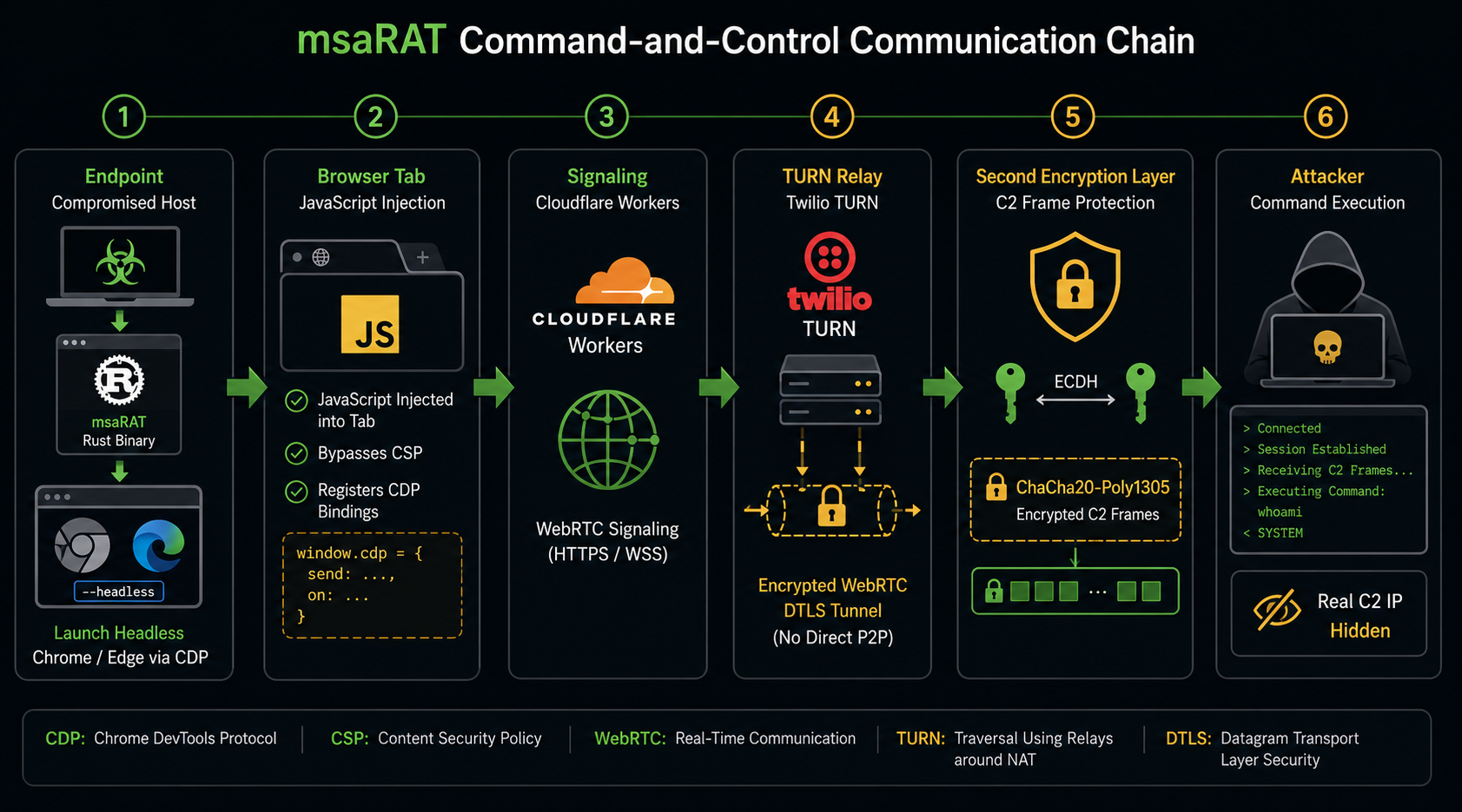
msaRAT uses a multi-stage browser-based communication architecture.
First, it launches Chrome or Edge in headless mode. Then it enables the remote debugging interface and controls the browser through Chrome DevTools Protocol.
Next, it opens a tab and injects JavaScript. The injected script builds the communication channel and bypasses page-level Content Security Policy because CDP operates below normal page restrictions.
The browser then contacts a Cloudflare Workers endpoint for WebRTC signaling. After that, the connection relays through Twilio TURN servers rather than connecting directly to the attacker.
Finally, msaRAT wraps its C2 content in dual encryption. WebRTC provides one encrypted layer, and the malware adds ChaCha20-Poly1305 with ECDH for a second layer.
The result is a C2 channel that looks like normal browser traffic while hiding the attacker’s real server.
Step One: Headless Chrome or Edge Launch
msaRAT starts by finding Chrome or Microsoft Edge on the victim machine.
It then launches the browser in headless mode. Headless mode runs a full browser session without showing a visible window to the user.
Developers use headless browsers for automated testing, web scraping, and CI/CD pipelines. msaRAT abuses the same legitimate feature to create a hidden communication proxy.
The user sees nothing. The operating system sees a trusted browser process. The network sees outbound browser traffic.
That trust is exactly what the malware exploits.
Step Two: Chrome DevTools Protocol Control
After launching the browser, msaRAT enables remote debugging and connects through Chrome DevTools Protocol.
CDP is a legitimate debugging interface used by automation tools such as Puppeteer and Selenium. It allows software to control browser tabs, inject scripts, read page data, and interact with browser sessions.
msaRAT uses CDP as a control layer.
This does not require a browser exploit. The malware uses intended browser automation features after it already runs on the endpoint.
Security teams should therefore monitor abnormal CDP use, especially on non-developer workstations.
Step Three: JavaScript Injection and CSP Bypass
msaRAT opens a browser tab and injects JavaScript through CDP.
This injected JavaScript builds the WebRTC communication path and registers CDP bindings that allow the malware process and browser tab to exchange data.
Because CDP controls the browser below page-level security, the injected script can bypass Content Security Policy restrictions.
CSP normally limits what scripts and connections a page can load. However, CDP-driven script injection does not behave like ordinary web page script loading.
This turns the browser into a trusted transport layer for attacker-controlled communication.
Step Four: Cloudflare Workers Signaling
The injected browser script contacts a Cloudflare Workers endpoint for signaling.
Cisco Talos observed the endpoint is-01-ast[.]ols-img-12[.]workers[.]dev.
Cloudflare Workers is widely used for legitimate applications. Blocking the entire workers.dev space would disrupt many real services.
That makes broad blocking unrealistic for most enterprises.
Instead, defenders should log and baseline workers.dev activity. Unknown Cloudflare Workers subdomains from non-developer endpoints should trigger review, especially when combined with headless browser launch activity.
Step Five: Twilio TURN Relay
msaRAT then uses Twilio TURN servers to relay WebRTC traffic.
Standard WebRTC often tries peer-to-peer communication first and uses TURN only when direct communication fails. msaRAT intentionally avoids direct peer-to-peer paths and forces the traffic through TURN.
This matters because the attacker’s real C2 server IP never appears in endpoint network traffic.
Security tools see Twilio infrastructure. They do not see the attacker.
That design makes IP reputation and destination-based blocking far less useful.
Step Six: Dual-Layer Encryption
msaRAT uses two encryption layers.
WebRTC provides DTLS encryption automatically through the browser. Then msaRAT adds its own ChaCha20-Poly1305 encryption with ECDH key exchange.
This means the C2 content remains opaque even if defenders can observe the browser connection.
Content inspection, SSL inspection, and deep packet inspection cannot reliably reveal the commands inside this channel.
Security teams must detect behavior around the channel rather than rely on reading its contents.
Step Seven: Frame-Based Command Execution
Cisco Talos documented that msaRAT structures communication into frames.
These frames support key exchange, channel opening and closing, session resets, and Windows command execution.
That structured design lets the operator run organized command sessions over one WebRTC data tunnel.
From the network perspective, this can still look like ordinary encrypted browser traffic.
From the endpoint perspective, defenders must look for the unusual sequence: MSI execution, in-memory DLL loading, headless browser launch, CDP remote debugging, Cloudflare Workers contact, and WebRTC TURN traffic.
Timeline: Chaos Ransomware and msaRAT Development
Chaos ransomware emerged in early 2025 as a newer operation unrelated to the older ransomware family that used the same name.
Rapid7 later reported that Iranian state-backed MuddyWater used Chaos ransomware as a decoy to make espionage activity appear financially motivated.
In mid-2026, Cisco Talos observed Chaos attacks beginning with email and voice phishing. The attackers used remote management tools for persistence and then delivered an MSI installer posing as a Windows update.
That installer loaded msaRAT through lib.dll in memory.
On July 23, 2026, Cisco Talos published its technical analysis, and public reporting highlighted the browser-based C2 technique.
Enterprise Impact of msaRAT Malware Chrome Edge C2
The enterprise impact is serious because msaRAT hides behind tools and services businesses already trust.
Chrome and Edge are allowed almost everywhere. Cloudflare and Twilio are legitimate cloud providers. WebRTC is a normal browser capability. CDP is a valid automation interface.
This makes traditional blocking difficult.
A security team that only blocks known bad IPs or malware domains may miss the entire communication path. The attacker’s real C2 infrastructure remains hidden behind trusted relay services.
The impact also extends beyond ransomware. Because of the reported MuddyWater and Chaos connection, defenders should treat some Chaos-related incidents as potential espionage activity, not only financial extortion.
Why Browser Processes Are Now C2 Risk
Browsers are no longer just user-facing applications.
They can become programmable automation engines, communication relays, and hidden attacker transport layers.
msaRAT shows how malware can use a trusted browser process without modifying the browser or exploiting a browser vulnerability.
Security teams need visibility into abnormal browser behavior. That includes headless mode, remote debugging flags, local CDP ports, unusual WebRTC activity, and browser sessions created by suspicious parent processes.
Browser telemetry now belongs in endpoint detection strategy.
Why Trusted Infrastructure Makes Blocking Hard
Cloudflare and Twilio are not malicious services.
That is exactly why attackers use them.
Blocking these services broadly can break legitimate applications, communications, authentication flows, automation, and development workflows.
Therefore, defenders need targeted detection rather than broad deny lists.
The goal is not to block every Cloudflare Workers or Twilio connection. The goal is to identify abnormal patterns from endpoints that should not be using headless browsers, CDP, WebRTC data channels, or TURN relays.
Why In-Memory Loading Weakens File-Based Detection
msaRAT loads through lib.dll directly into memory.
That matters because file-based detection depends on scanning files that exist on disk.
When malware avoids writing a conventional executable, defenders need memory scanning, behavioral telemetry, process lineage analysis, and EDR visibility.
The MSI installer also adds trust abuse. Users may believe they are installing a legitimate Windows update, especially after voice phishing or IT-themed social engineering.
This makes user education, application control, and endpoint behavior monitoring all necessary.
Real-World Attack Scenarios
In a voice phishing scenario, an attacker calls an employee and claims a manual Windows update is required. The employee downloads and runs an MSI installer. The installer loads lib.dll into memory, launches Chrome in headless mode, and establishes a hidden WebRTC C2 tunnel through Cloudflare and Twilio.
In an espionage decoy scenario, attackers deploy Chaos ransomware to create a visible extortion incident while msaRAT quietly supports long-term access and data collection. The organization focuses on ransomware recovery and misses the hidden browser-based C2 channel.
In a persistent backdoor scenario, responders remove the visible ransomware payload but miss msaRAT persistence. The hidden C2 channel continues through Chrome or Edge after the initial incident appears contained.
These scenarios follow the technical mechanics documented by Cisco Talos and public reporting. They do not assume unverified capabilities beyond the documented attack chain.
How to Detect msaRAT Malware Chrome Edge C2
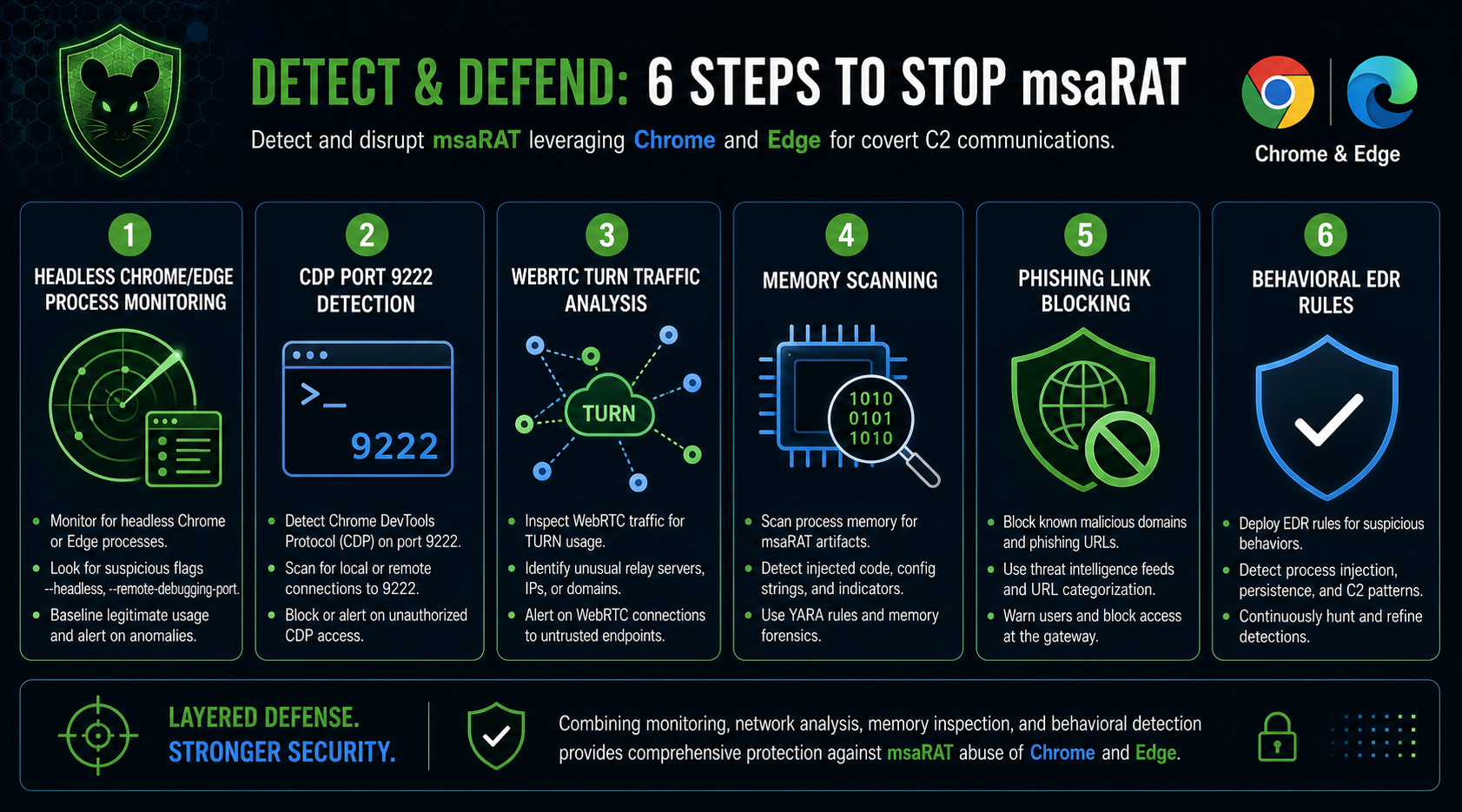
Detection requires endpoint behavior correlation.
No single indicator is enough. Chrome can launch legitimately. WebRTC can be normal. Cloudflare and Twilio are common. MSI installers may be valid. CDP can be used by developers.
The full sequence matters.
Security teams should build detections around MSI execution followed by in-memory DLL loading, headless Chrome or Edge launch, remote debugging flags, local CDP port activity, Cloudflare Workers traffic, and WebRTC TURN relay behavior.
That combined chain creates a much stronger msaRAT signal.
Priority One: Monitor Headless Browser Launches
Alert on Chrome or Edge processes launched with headless mode enabled.
Common indicators include command-line flags such as --headless, --remote-debugging-port, and unusual automation-related options.
This does not mean every headless browser is malicious. Developer systems, QA environments, and CI/CD tools may use headless browsers legitimately.
The key is inventory. Know where headless browsers are expected. Alert where they are not.
Non-developer workstations running headless Chrome or Edge deserve immediate review.
Priority Two: Detect CDP Remote Debugging
Monitor for unexpected Chrome DevTools Protocol activity.
CDP remote debugging often uses local port 9222. Unexpected browser processes listening on that port should trigger alerts, especially outside development systems.
Security teams should baseline legitimate browser automation.
Unknown CDP activity on finance, HR, executive, call center, helpdesk, or general office endpoints should receive high priority.
Attackers use CDP because defenders rarely monitor it closely.
Priority Three: Correlate MSI Execution With Browser Automation
Create SIEM and EDR rules that link MSI execution to browser automation behavior.
The sequence matters. An MSI installer runs. A DLL loads into memory. Chrome or Edge starts in headless mode. CDP remote debugging activates. WebRTC traffic begins.
No single event proves msaRAT, but the chain is suspicious.
This approach is stronger than relying on static hashes because attackers can modify files while preserving the same behavior.
Priority Four: Monitor Cloudflare Workers and Twilio TURN Use
Do not block all Cloudflare Workers or Twilio traffic without business review.
Instead, monitor unusual usage.
Look for workers.dev domains contacted by non-developer workstations, unexpected WebRTC activity from headless browsers, and TURN relay traffic from endpoints that do not normally use real-time communications.
The specific Cloudflare Workers subdomain reported by Cisco Talos should be blocked. Unknown similar behavior should be investigated.
Priority Five: Use Memory Scanning and EDR Behavior Rules
File-only detection is not enough for msaRAT.
The malware loads lib.dll into memory through the installer chain. Security teams need endpoint tools that can detect in-memory payloads, suspicious DLL loading, process injection, and unusual browser process behavior.
EDR rules should focus on process lineage.
A user-initiated MSI that leads to hidden browser automation and WebRTC traffic should not look normal.
Priority Six: Harden Against Email and Voice Phishing
Cisco Talos reported that recent Chaos attacks began with email or voice phishing.
Security teams should block or quarantine suspicious MSI downloads. They should also train users to verify any inbound call that asks them to install software or run an update manually.
Helpdesk impersonation remains effective because users trust IT support.
Require out-of-band verification for software installation requests triggered by calls, chats, or unexpected emails.
Priority Seven: Investigate Chaos Incidents as Possible Espionage
The Chaos and MuddyWater connection changes incident scope.
A Chaos ransomware incident may not only be a financial extortion event. It may also hide espionage activity behind the visible ransomware impact.
Security teams should investigate data access, long-term persistence, credential theft, and outbound communication history.
For related AI and Active Directory intrusion context, see Digital Warfare’s Active Directory Faces a Dangerous New AI Script Threat
Broader Security Lessons From msaRAT C2 Architecture
msaRAT shows that trusted infrastructure can become attacker infrastructure without becoming malicious itself.
That changes how defenders think about C2.
Blocking known bad domains is no longer enough. Attackers can route through legitimate browser processes, trusted developer platforms, real-time communications protocols, and cloud relay services.
Defenders need to shift from reputation-only blocking to behavioral detection.
That means watching browser launch patterns, process lineage, remote debugging activity, in-memory loading, WebRTC behavior, and unexpected cloud relay usage.
Why Trusted Browsers Need Stronger Monitoring
Chrome and Edge are high-trust enterprise processes.
They also have powerful automation features. Those features support legitimate work, but attackers can abuse them after initial compromise.
Security teams should not treat all browser traffic as automatically safe.
They should inspect how browsers launch, which parent processes start them, what command-line flags appear, and whether automation interfaces are active.
Trusted processes still need behavioral guardrails.
Why C2 Detection Must Move Beyond IP Reputation
IP reputation works when attackers use suspicious servers.
msaRAT avoids that weakness by routing communication through Cloudflare and Twilio.
This means destination reputation can look clean while the activity remains malicious.
Modern C2 detection must include endpoint context, process behavior, DNS patterns, timing, parent-child process relationships, and protocol usage.
The question is no longer only where the traffic goes. It is why that endpoint, process, and user should be making that traffic.
Key Takeaway on msaRAT Malware Chrome Edge C2
msaRAT malware Chrome Edge C2 traffic is dangerous because it hides inside trusted browser processes and legitimate cloud infrastructure.
The Chaos ransomware group uses msaRAT to launch Chrome or Edge in headless mode, control the browser through Chrome DevTools Protocol, inject JavaScript, establish WebRTC communication, relay traffic through Twilio TURN, and hide signaling behind Cloudflare Workers.
The attacker’s real C2 server never appears directly in endpoint network traffic.
Defenders should monitor headless browser launches, CDP remote debugging, MSI-to-browser automation sequences, WebRTC TURN traffic, Cloudflare Workers activity, and in-memory DLL loading.
What Organizations Should Do Now
Inventory where headless Chrome or Edge usage is legitimate.
Alert on unexpected --headless and --remote-debugging-port browser launches.
Monitor local CDP port activity, especially port 9222, on non-developer systems.
Create SIEM rules that correlate MSI execution, in-memory DLL loading, headless browser launch, CDP activation, and WebRTC traffic.
Log and review workers.dev DNS queries from endpoints that do not run development workloads.
Monitor Twilio TURN traffic from systems that do not normally use WebRTC applications.
Block the specific Cisco Talos-reported Cloudflare Workers subdomain and load the published IOC set into SIEM and EDR tools.
Train users against voice phishing and fake Windows update installation requests.
For the one external source in this article, review Cisco Talos’ IOC repository for Chaos msaRAT: Cisco Talos Chaos msaRAT IOC List
Frequently Asked Questions About msaRAT Malware Chrome Edge C2
What Is msaRAT Malware Chrome Edge C2?
msaRAT malware Chrome Edge C2 refers to a Chaos ransomware backdoor that routes command-and-control communication through Chrome or Edge using Chrome DevTools Protocol and WebRTC.
How Does msaRAT Use Chrome or Edge?
msaRAT launches Chrome or Edge in headless mode, enables remote debugging, controls the browser through Chrome DevTools Protocol, injects JavaScript, and uses the browser to carry C2 traffic.
Why Is msaRAT Difficult to Detect?
msaRAT is difficult to detect because traffic appears to come from trusted browser processes and travels through legitimate infrastructure such as Cloudflare Workers and Twilio TURN servers.
What Role Does WebRTC Play in msaRAT?
WebRTC provides the browser-based data channel used for C2 communication. msaRAT forces traffic through Twilio TURN relays rather than exposing the attacker’s real C2 infrastructure.
What Encryption Does msaRAT Use?
msaRAT uses WebRTC DTLS encryption and adds an inner encryption layer using ChaCha20-Poly1305 with ECDH key exchange.
How Is msaRAT Delivered?
Cisco Talos reported that recent Chaos attacks began with email or voice phishing, followed by remote management software and an MSI installer posing as a Windows update that loads lib.dll into memory.
What Should Security Teams Monitor?
Security teams should monitor headless Chrome or Edge launches, remote debugging flags, CDP port activity, MSI execution followed by browser automation, Cloudflare Workers traffic, Twilio TURN usage, and in-memory DLL loading.
How Can Organizations Reduce msaRAT Risk?
Organizations can reduce risk by inventorying legitimate browser automation, alerting on unexpected CDP activity, improving memory-based detection, blocking known IOCs, monitoring Cloudflare Workers and Twilio traffic patterns, and training users against email and voice phishing.

