

Introduction
A Hotel Wi-Fi attack is now being used to steal Microsoft 365 credentials from traveling corporate employees without phishing emails, malware, or malicious links.
Attackers are compromising public Wi-Fi gateways at hotels, conference centers, and shared venues. Once they control the gateway, they modify DNS behavior and redirect users toward attacker-controlled Microsoft 365 login infrastructure.
The employee does not need to click anything suspicious. They connect to hotel Wi-Fi, open Microsoft 365, and trust the network resolver they were given. If the gateway is compromised, that trust becomes the attack path.
This campaign has been active since at least June 2026 and has affected shared Wi-Fi environments across multiple US cities, India, and Saudi Arabia. The activity has touched organizations in financial services, professional services, legal, healthcare, energy, and retail.
The real lesson is bigger than one campaign. Business travel now creates identity risk before an employee ever reaches a phishing email. Security leaders need to treat public Wi-Fi as an untrusted authentication environment and enforce controls that protect Microsoft 365 access wherever employees connect.
For related network infrastructure threat context, see Digital Warfare’s Russian FSB router exploitation analysis
Why This Hotel Wi-Fi Attack Matters to Enterprise Security
This Hotel Wi-Fi attack matters because it bypasses many controls organizations normally rely on first.
Email filtering cannot block an attack that sends no email. Endpoint protection cannot detect malware that never runs on the device. User awareness training cannot fully protect an employee who does nothing wrong except connect to compromised public Wi-Fi.
The attacker controls the gateway, not the endpoint.
That distinction changes the risk model. The employee’s laptop may be clean. Their browser may be updated. Their Microsoft 365 password may be strong. Their MFA may still be enabled. The compromise begins because the network infrastructure gives the device a malicious DNS answer.
Once attackers redirect Microsoft 365 authentication traffic, they can capture credentials, session tokens, OAuth approvals, or application traffic depending on the technique used.
For enterprises, this becomes a travel security problem, an identity security problem, and a network trust problem at the same time.
What Happened in the Hotel Wi-Fi Attack Campaign
Public threat intelligence reporting identified a campaign where attackers compromised captive portal Wi-Fi gateways at hotels, conference centers, and other shared venues.
These gateways control guest access. They often manage DHCP, DNS, authentication prompts, routing, session tracking, and portal redirection for every visitor on the network.
Once attackers gain administrative control of the gateway, they can modify DNS responses for users who connect to that Wi-Fi network.
The campaign used Microsoft-themed domains such as m365-owa[.]com, owa-ms365[.]com, ms365-device[.]com, and ms365-live[.]com. These domains impersonated Microsoft authentication infrastructure and supported credential or token theft.
The confirmed attacker infrastructure included 31.57.243[.]154, 104.194.159[.]150, and DNS-poisoning response address 38.146.28[.]75.
The campaign shows how attackers can move credential theft from the inbox to the network layer. Instead of persuading a user to click a link, attackers compromise the gateway that tells the user’s device where to go.
How the Hotel Wi-Fi Attack Works
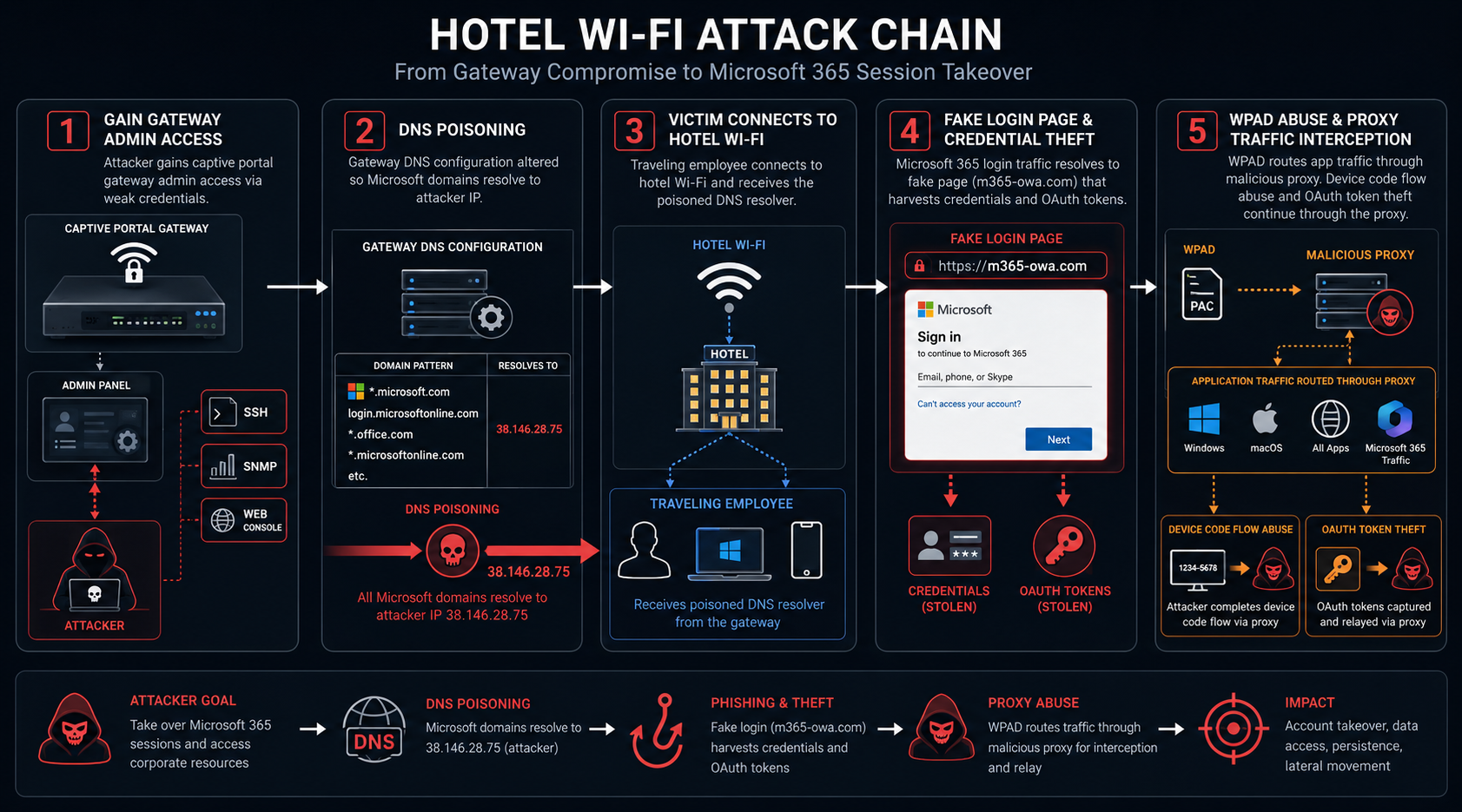
The attack begins with gateway compromise.
Attackers target the device that manages public Wi-Fi access. These devices often sit in hotels, conference centers, airports, universities, hospitals, event venues, and hospitality environments.
The suspected initial access path includes exposed management interfaces such as SSH, SNMP, or web administration panels combined with weak, reused, or default administrator credentials.
After attackers control the gateway, they can change DNS behavior for every device that joins the network.
That gives them a powerful position. Every connected device trusts the DNS resolver handed to it by the network. If the resolver lies, the user’s browser can be silently redirected to attacker-controlled infrastructure.
Stage One: Captive Portal Gateway Compromise
The first stage targets the captive portal gateway.
A captive portal gateway controls how guests connect to public Wi-Fi. It can assign IP addresses, issue DNS settings, display login pages, and route traffic.
Many organizations focus security attention on laptops, cloud accounts, and endpoint software. Attackers in this campaign target the infrastructure that sits between the user and the internet.
That creates scale. One compromised gateway can affect every guest who connects during the compromise window.
A hotel gateway can expose executives, consultants, lawyers, doctors, sales teams, engineers, and administrators from many companies at once.
Stage Two: DNS Poisoning Redirects Microsoft 365 Traffic
After attackers control the gateway, they modify DNS responses.
When a traveling employee tries to access Microsoft 365, the device asks the network resolver where to go. The compromised gateway can return an attacker-controlled destination instead of the legitimate Microsoft service.
The user may see what appears to be a Microsoft 365 login page. The page may feel normal because the user expected to authenticate after joining a new network or opening Outlook, Teams, SharePoint, or OneDrive.
This is the core of the Hotel Wi-Fi attack. The attacker abuses the trust between the device and the local network resolver.
The employee does not need to make a mistake. The network provides the malicious direction.
Stage Three: Credential and Token Theft Without Phishing
Once the user reaches attacker-controlled Microsoft-themed infrastructure, the attacker can collect credentials or session material.
In an adversary-in-the-middle flow, the attacker proxies authentication to Microsoft. The user completes a real MFA prompt. The attacker then captures the resulting session token after authentication succeeds.
This bypasses standard MFA because the attacker does not defeat MFA before login. They capture access after MFA has already been completed.
That is why token theft is so dangerous. The user sees a familiar authentication process, approves the prompt, and unknowingly gives the attacker a valid session path.
Enterprises that rely only on standard push MFA, SMS, or one-time codes remain exposed to this class of attack.
Stage Four: WPAD Abuse Expands the Attack Surface
The campaign also included WPAD abuse in some observed cases.
WPAD, or Web Proxy Auto-Discovery, allows devices to automatically discover proxy settings after joining a network.
A compromised gateway can respond to WPAD requests and point the device to a malicious proxy configuration.
This expands the attack beyond a browser login page. It can affect application traffic from Outlook, Teams, SharePoint sync, and other enterprise applications that use system proxy settings.
That matters because some employees may never manually enter credentials into a fake page. Their applications may still send authenticated traffic through attacker-controlled proxy infrastructure.
Organizations should not treat this as a browser-only risk.
Stage Five: Device Code OAuth Flow Abuse
The campaign also included limited abuse of Microsoft’s device code authentication flow.
Device code authentication exists for devices that cannot easily display a browser, such as smart TVs, printers, and similar devices. It allows a user to enter a code on another device to approve access.
Attackers abuse this flow by initiating an authorization request and convincing the user to approve it.
Once approved, Microsoft issues OAuth tokens to the attacker-controlled client. The attacker does not need the user’s password directly.
This technique is dangerous because the prompt can look like a legitimate Microsoft authorization step. If the user approves it, the attacker receives authenticated access.
Timeline of the Hotel Wi-Fi Attack Campaign
Router-based DNS poisoning against Microsoft 365 accounts had already appeared in earlier campaigns targeting SOHO routers.
By June 2026, attackers expanded similar tradecraft into hotel and conference center captive portal environments.
In July 2026, public reporting described the campaign’s use of compromised hospitality gateways, Microsoft-themed lure domains, DNS poisoning, WPAD abuse, and device code flow abuse.
The timing matters because business travel creates recurring exposure. Employees may connect to multiple public Wi-Fi environments every month, and each network can become a hostile authentication path if its gateway is compromised.
This is not a temporary travel inconvenience. It is an enterprise identity security risk.
Enterprise Impact of the Hotel Wi-Fi Attack
The enterprise impact is serious because the campaign targets users outside the corporate perimeter.
Traveling employees often access Microsoft 365 from hotel Wi-Fi, conference Wi-Fi, airport Wi-Fi, university Wi-Fi, hospital Wi-Fi, and event networks. These networks sit outside enterprise control, but employees still use them to reach email, Teams, SharePoint, OneDrive, and business applications.
If a public Wi-Fi gateway is compromised, attackers can reach the user before corporate controls see the authentication request.
That creates a gap between where the employee works and where the enterprise can enforce security.
This is why Digital Warfare treats travel security, identity security, and network trust as one connected problem. Microsoft 365 compromise can begin on infrastructure the organization does not own.
Why Standard MFA Is Not Enough
Standard MFA helps reduce password-only compromise, but it does not fully stop adversary-in-the-middle token theft.
In this attack, the user can complete real MFA successfully. The attacker captures the session token after authentication.
This means TOTP codes, SMS codes, and push approvals may not be enough.
Phishing-resistant FIDO2 security keys and passkeys provide stronger protection because they bind authentication to the legitimate domain. An attacker-controlled proxy cannot reproduce that cryptographic binding.
For frequent travelers, executives, administrators, legal teams, finance teams, healthcare users, and sales teams, phishing-resistant MFA should become a high-priority control.
Why Business Travelers Are High-Value Targets
Business travelers are valuable targets because they work from unfamiliar networks under time pressure.
They need to check email, join meetings, review contracts, access files, approve workflows, and communicate with customers.
Hotel and conference Wi-Fi often feels routine. Captive portal prompts feel normal. Microsoft 365 reauthentication also feels normal after joining a new network.
Attackers exploit that routine.
They do not need to identify one perfect victim in advance. A compromised gateway can expose many corporate users from many organizations at the same time.
This makes shared Wi-Fi venues attractive credential harvesting infrastructure.
Why Captive Portal Networks Create Hidden Risk
Captive portal networks are designed for convenience.
They let guests connect quickly, accept terms, enter room numbers, authenticate with event credentials, or start a temporary session.
That convenience can hide weak security.
Some gateways expose management interfaces to the internet. Some use old firmware. Some rely on default credentials. Some do not receive the same monitoring as enterprise firewalls.
If attackers compromise the gateway, they can influence every device that trusts it.
Security leaders should treat every public Wi-Fi network as untrusted, even when it belongs to a reputable venue.
Real-World Attack Scenarios
A conference center attack begins when attackers compromise the venue’s captive portal gateway before a major industry event. Thousands of attendees connect to the Wi-Fi network. When they access Microsoft 365, poisoned DNS redirects them toward attacker-controlled infrastructure. The attacker collects credentials and tokens across multiple organizations during the event.
A hotel executive attack begins when a senior leader connects to hotel Wi-Fi during a business trip. Outlook and Teams attempt to authenticate. WPAD abuse routes application traffic through a malicious proxy. The attacker captures authenticated traffic without requiring the executive to click a phishing link.
An international travel incident begins when a legal or finance team connects to compromised hotel Wi-Fi overseas. Attackers capture Microsoft 365 session tokens. Weeks later, the organization sees unusual SharePoint access from unfamiliar infrastructure. The root cause traces back to a hotel Wi-Fi session.
These scenarios reflect the observed campaign mechanics and the business risks those mechanics create.
How to Stop Hotel Wi-Fi Attack Credential Theft
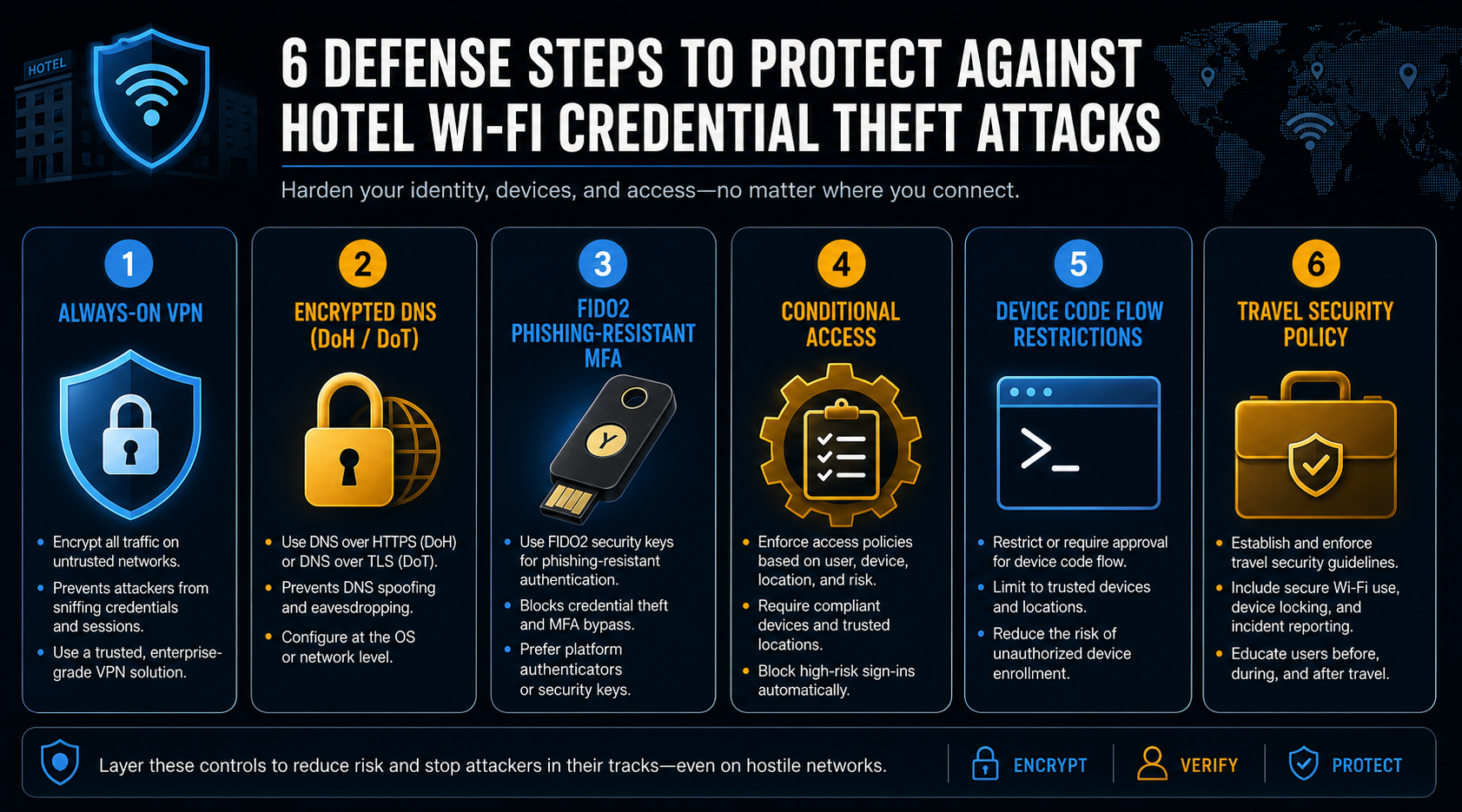
Organizations should respond in priority order.
The first priority is to prevent hostile local DNS from touching corporate traffic. The second priority is to make Microsoft 365 authentication resistant to adversary-in-the-middle token theft. The third priority is to reduce proxy, OAuth, and travel exposure.
This is not a problem that one user training module can solve. It requires enforced technical controls.
For Microsoft 365 hardening support, see Digital Warfare’s Office 365 security services
Priority One: Enforce Always-On Full-Tunnel VPN
Always-on full-tunnel VPN is the highest-impact control for this attack class.
Full-tunnel VPN routes all traffic, including DNS, through the corporate network before the hotel gateway can influence it.
That makes the poisoned DNS resolver irrelevant. The device does not ask the hotel network where Microsoft 365 lives. It asks the trusted corporate resolver through the VPN tunnel.
The VPN should activate automatically as soon as the device joins any network. It should also block internet access until the tunnel is established.
Split tunneling weakens this protection if DNS or Microsoft 365 authentication traffic can bypass the tunnel.
Priority Two: Deploy Strict-Mode Encrypted DNS
Strict-mode encrypted DNS provides another strong layer.
DNS over HTTPS and DNS over TLS can stop a hostile gateway from forging DNS responses, but only when plaintext fallback is disabled.
Opportunistic encrypted DNS is not enough. If encrypted resolution fails and the device falls back to plaintext DNS, the compromised gateway can still poison the response.
Strict mode forces the device to use the approved encrypted resolver and reject untrusted DNS responses.
Security teams should validate this configuration across Windows, macOS, mobile devices, browsers, endpoint DNS tools, and system services.
Priority Three: Move High-Risk Users to FIDO2 MFA
Phishing-resistant MFA is essential for users who travel or hold privileged access.
FIDO2 hardware security keys and passkeys bind authentication cryptographically to the legitimate domain.
That domain binding makes adversary-in-the-middle token theft much harder because the attacker-controlled site cannot complete authentication as if it were Microsoft’s real domain.
Start with executives, administrators, legal teams, finance teams, healthcare users, sales teams, and frequent travelers.
Then expand phishing-resistant authentication across the organization.
Priority Four: Restrict Device Code Authentication
Organizations should review whether broad device code authentication is necessary.
Many enterprise users do not need device code flow for daily work.
Microsoft Entra ID conditional access policies can restrict or block device code authentication, especially from unmanaged devices, unfamiliar locations, risky sign-ins, and users with no business need.
Where the flow remains necessary, limit it to approved applications and monitored scenarios.
This reduces the attacker’s ability to trick users into approving malicious authorization requests.
Priority Five: Harden Conditional Access
Conditional access helps reduce the impact of stolen credentials or tokens.
Require compliant managed devices for Microsoft 365 access. Evaluate sign-in risk, device state, location anomalies, impossible travel, and unusual token behavior.
Apply stricter rules for privileged users and traveling employees.
If attackers capture credentials or tokens from hotel Wi-Fi, conditional access can add friction before those credentials become full account compromise.
Priority Six: Disable WPAD Where It Is Not Required
WPAD creates unnecessary proxy risk on untrusted networks.
If your organization does not require automatic proxy discovery, disable WPAD through Group Policy or endpoint management.
Where WPAD remains necessary, restrict proxy auto-configuration retrieval to approved internal hosts only.
This reduces the chance that a hostile gateway can route application traffic through attacker-controlled proxy infrastructure.
Priority Seven: Build a Travel Security Policy
A travel security policy should make public Wi-Fi risk clear.
Employees should use corporate-approved mobile hotspots or cellular data for sensitive work whenever possible. If they must use hotel or conference Wi-Fi, they should connect through always-on VPN before accessing corporate resources.
The policy should cover Microsoft 365 access, Teams, SharePoint, OneDrive, email, VPN, captive portals, device code prompts, and suspicious login pages.
Security awareness should move beyond email phishing. This campaign proves credential theft can begin at the network layer without a malicious email.
For enterprise security leadership and governance support, see Digital Warfare’s vCISO services
What Security Teams Should Monitor
Security teams should review Microsoft Entra ID logs for suspicious sign-ins, OAuth grants, device code authentication events, unfamiliar IP addresses, and impossible travel.
They should monitor for activity tied to m365-owa[.]com, owa-ms365[.]com, ms365-device[.]com, and ms365-live[.]com.
They should review DNS and proxy logs for requests involving attacker-controlled infrastructure or suspicious Microsoft-themed domains.
They should also investigate user reports of unusual Microsoft login prompts after travel, hotel stays, conferences, airport Wi-Fi use, university visits, hospital networks, or event venues.
Monitoring should focus on identity behavior, not only endpoint alerts.
Broader Security Lessons From the Hotel Wi-Fi Attack
This Hotel Wi-Fi attack reinforces several enterprise security lessons.
First, infrastructure-level attacks can bypass user-centric controls. The user may never receive a phishing email or download malware.
Second, travel security belongs inside identity security. Microsoft 365 compromise can begin on a third-party gateway the organization does not own.
Third, standard MFA can create false confidence when adversary-in-the-middle token theft is possible.
Fourth, always-on full-tunnel VPN should become standard for managed corporate devices used during travel.
Fifth, DNS security must be enforced. Optional or opportunistic DNS protection is not enough against hostile gateways.
Why This Attack Is Evergreen for Enterprise Security
The campaign is current, but the risk is evergreen.
Employees will continue to travel. Hotels and conference centers will continue offering captive portal Wi-Fi. Microsoft 365 will remain a high-value identity target. Attackers will continue abusing DNS, OAuth, proxy settings, and trusted network assumptions.
That means this is not a one-week news story.
It is a long-term enterprise control problem.
The right response is not a temporary blocklist. The right response is a stronger travel security architecture that protects identity traffic wherever employees work.
Key Takeaway on the Hotel Wi-Fi Attack
This Hotel Wi-Fi attack shows how attackers can steal Microsoft 365 credentials and tokens without phishing or malware.
By compromising captive portal gateways, attackers can poison DNS responses, redirect Microsoft 365 authentication traffic, abuse WPAD, and exploit device code OAuth flows.
The strongest defenses are always-on full-tunnel VPN, strict-mode encrypted DNS, phishing-resistant FIDO2 MFA, restricted device code authentication, hardened conditional access, WPAD reduction, and a clear travel security policy.
Security leaders should treat public Wi-Fi as untrusted infrastructure by default.
What Organizations Should Do Now
Identify employees who traveled for work since June 2026 and used hotel, conference, airport, university, hospital, or event Wi-Fi.
Review Microsoft Entra ID logs for suspicious sign-ins, OAuth grants, device code authentication events, unfamiliar IP addresses, impossible travel, and new sessions created shortly after travel.
Search for activity tied to m365-owa[.]com, owa-ms365[.]com, ms365-device[.]com, and ms365-live[.]com.
Enforce always-on full-tunnel VPN on all corporate devices.
Deploy strict-mode encrypted DNS with plaintext fallback disabled.
Move frequent travelers and privileged users to FIDO2 security keys or passkeys.
Restrict or disable Microsoft device code authentication where not required.
Disable WPAD where possible.
Update travel security policies so employees understand public Wi-Fi and captive portal risks.
For the one external source in this article, review the original public threat report: DNS Poisoning Tactics Expand to Hospitality Wi-Fi

