
Introduction
An AI PowerShell script helped an attacker map an Active Directory environment during a real June 2026 intrusion documented by Huntress.
The attacker used pre-compromised credentials to access a domain-joined Windows Server through RDP, likely through VPN access. After gaining entry, the attacker staged tools in C:\ProgramData\ and executed a custom PowerShell script named Untitled1.ps1.
The script carried a revealing title: “100% Working AD Information Gathering Script - FULLY FIXED.” That wording strongly suggests iterative AI-assisted development, where the operator likely asked a large language model to fix errors until the script worked.
The script discovered the Domain Controller, enumerated users, computers, groups, organizational units, subnets, and trusts, then generated CSV files, an HTML report, and a ZIP archive.
This incident matters because the attack did not rely on a novel exploit. It used stolen credentials, RDP access, PowerShell, and AI-assisted scripting to accelerate a familiar Active Directory reconnaissance workflow.
For related AI-enabled attack coverage, see Digital Warfare’s AI-powered Active Directory attack and EDR evasion analysis
Why This AI PowerShell Script Matters
This AI PowerShell script matters because it lowers the barrier for custom offensive tooling.
Defenders have spent years building detections for known tools such as BloodHound, PowerSploit, SharpHound, Cobalt Strike, and other established frameworks. Those detections still matter, but AI-generated scripts create a different problem.
A unique script may have no known hash, no known filename, and no prior reputation. Signature-based tools may not recognize it because the file did not exist before the attacker generated it.
That does not make the attack invisible. The behavior still matters.
The script queried Active Directory, created reports, wrote CSV files, built an archive, and supported follow-on reconnaissance. Security teams should detect those behaviors regardless of the tool name.
What Huntress Observed
Huntress documented a real-world intrusion that occurred on June 3, 2026.
The attacker gained RDP access to a domain-joined Windows Server using pre-compromised credentials. The activity appears to have involved VPN access before the attacker staged tools in C:\ProgramData\.
Huntress reconstructed the PowerShell script from Windows Event ID 4104 telemetry, which captures PowerShell script block logging when properly enabled.
That point is important. Even if an attacker deletes a script from disk, Event ID 4104 can preserve the script content and support full forensic reconstruction.
The attacker also ran SharpShares.exe after the custom script to hunt for additional accessible file shares.
How the AI PowerShell Script Worked
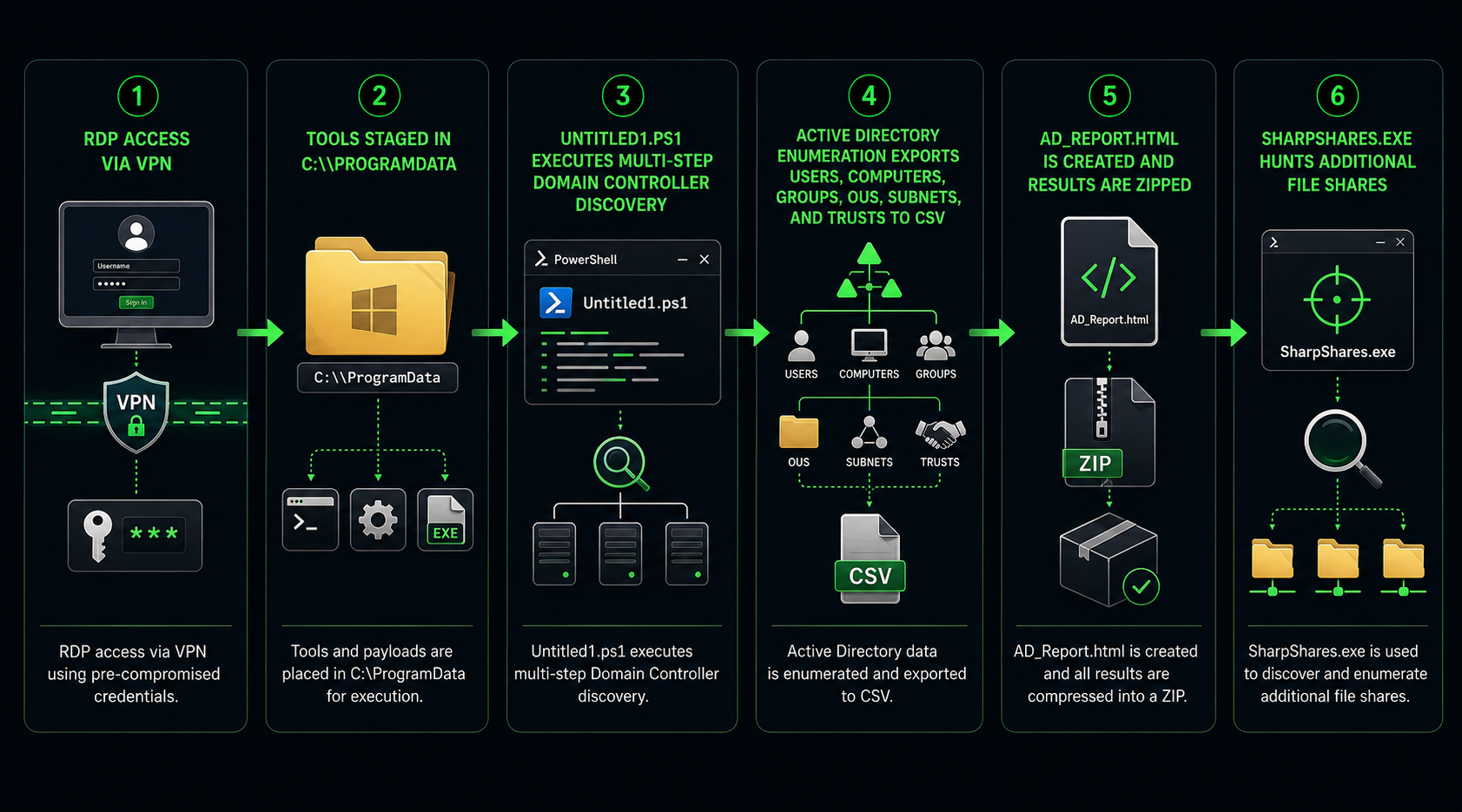
The AI PowerShell script followed a clear reconnaissance workflow.
First, it checked whether the system belonged to a domain.
Next, it tried to identify the Domain Controller using several fallback methods.
Then, it enumerated key Active Directory objects.
After that, it exported the results into structured files.
Finally, it generated an HTML report and compressed the output into a ZIP archive.
This workflow gave the attacker a usable map of the environment without needing to run a known AD enumeration framework.
Initial Access Through RDP and Stolen Credentials
The attacker did not need a zero-day vulnerability.
They used pre-compromised credentials and RDP access to enter a domain-joined Windows Server.
That matters because stolen credentials remain one of the most reliable attack paths in enterprise environments. If VPN and RDP access do not require strong MFA, conditional access, and device checks, attackers can turn one exposed password into internal access.
The AI-generated script was not the initial access method. It was the reconnaissance tool deployed after the attacker was already inside.
This distinction matters for defense. Blocking the script helps, but preventing stolen-credential access stops the attack earlier.
Why the Script Looks AI Generated
Several details point to AI-assisted development.
The title “100% Working AD Information Gathering Script - FULLY FIXED” sounds like an output from repeated troubleshooting prompts.
The script also used an overbuilt fallback chain to locate the Domain Controller. It tried DNS, nltest, the Active Directory PowerShell module, environment variables, and a hardcoded fallback.
That kind of exhaustive fallback logic is common in AI-generated code because the model tries to make the script work across many possible environments.
The script also included cosmetic output, structured reporting, and a polished HTML report. Those additions may be useful, but they also reflect how AI models often add helpful formatting even when the operator only needs quick reconnaissance.
Active Directory Enumeration Behavior
The AI PowerShell script collected the kind of data attackers need before ransomware, data theft, or lateral movement.
It exported users.
It exported computers.
It exported groups.
It exported organizational units.
It exported subnets.
It exported domain trusts.
It also compiled the information into an HTML report and compressed the results into a ZIP archive.
This data gives attackers a clearer view of privilege paths, important systems, trust relationships, and potential targets.
Active Directory enumeration is not the final attack. It is the planning phase that helps attackers decide where to move next.
SharpShares and Hybrid Tooling
The attacker also used SharpShares.exe after running the AI-generated script.
That is important because AI does not replace the entire attacker toolkit. It fills gaps.
Attackers may still use known tools when those tools work. They may use AI-generated scripts when they need something custom, fast, or harder to match with signatures.
This hybrid model is likely to become more common.
Defenders should keep detections for known tools, but they also need behavioral rules that catch the actions those tools perform.
Why Signature Detection Fails
Signature detection depends on prior knowledge.
If a file has never existed before, there may be no hash, no known indicator, and no existing malware family label.
AI-generated scripts can be created quickly, changed quickly, and regenerated after a detection fires.
That weakens static detection strategies.
However, the behavior remains harder to hide. Active Directory enumeration still creates LDAP queries, PowerShell execution, report generation, archive creation, and file system activity.
Security teams should focus on the operational footprint.
Enterprise Impact of the AI PowerShell Script
The AI PowerShell script creates several enterprise risks.
First, it lowers the skill barrier for attackers. Someone who cannot write a reliable AD enumeration tool can ask an LLM to generate one.
Second, it speeds up intrusion activity. Attackers can build, test, and modify scripts faster than before.
Third, it reduces the value of hash-based detection. Each script may be unique.
Fourth, it increases ransomware preparation risk. AD maps help attackers identify high-value users, systems, groups, and trust relationships.
Fifth, it makes logging more important. Without PowerShell script block logging, defenders may lose the best evidence of what happened.
Why Event ID 4104 Matters
Windows Event ID 4104 is one of the most important forensic controls in this incident.
PowerShell script block logging can capture the content of executed PowerShell code. That means defenders may recover a script even if the attacker deletes the file.
Huntress reconstructed the full script using this telemetry.
Organizations that do not enable script block logging lose that visibility.
Security teams should enable PowerShell logging across servers and endpoints, forward those logs to a SIEM, and alert on suspicious script behavior.
Real-World Attack Scenarios
A stolen credential scenario starts when an attacker buys or obtains VPN credentials. The attacker logs in through RDP, stages an AI-generated script inC:\ProgramData\, and maps the domain.
A ransomware preparation scenario starts after the attacker enumerates users, groups, computers, subnets, and trusts. The attacker uses that map to identify privileged accounts and high-value systems before deploying ransomware.
A detection bypass scenario affects organizations that rely only on known tool signatures. The AI-generated script has no known hash, so it runs without a signature match.
A hybrid tooling scenario starts when defenders detect SharpShares, but miss the custom script that already collected the AD report.
These scenarios reflect realistic attack paths based on the documented mechanics.
How to Defend Against AI PowerShell Script Attacks
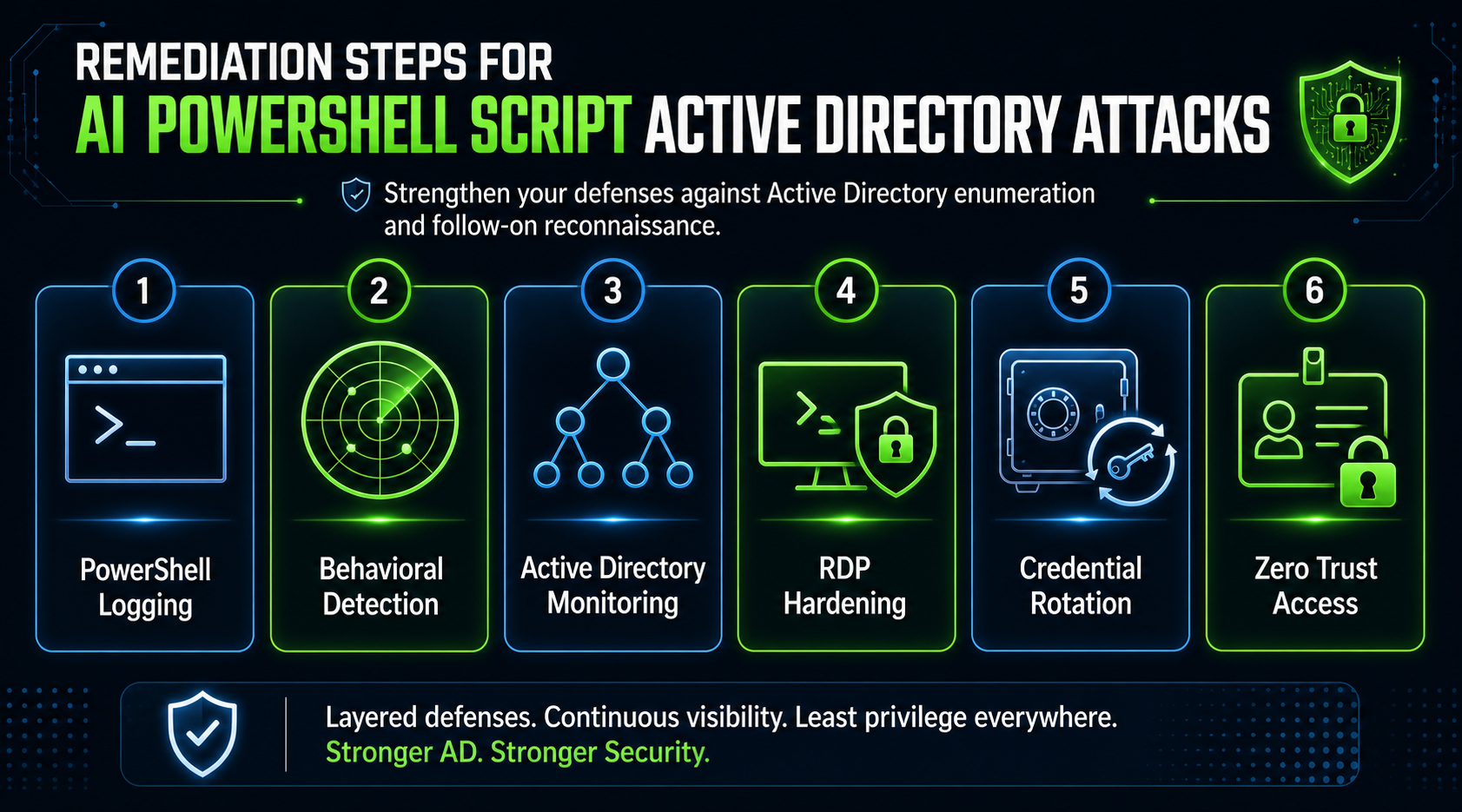
Defending against AI PowerShell script attacks requires behavior-based detection and stronger identity controls.
Start by enabling PowerShell script block logging.
Then monitor Active Directory enumeration behavior.
Next, harden RDP and VPN access with MFA, conditional access, and device posture checks.
After that, restrict script execution on systems that do not need unrestricted PowerShell.
Finally, treat unusual AD mapping activity as an early warning sign for ransomware preparation.
Enable PowerShell Script Block Logging
PowerShell script block logging should be enabled across Windows servers and endpoints.
This control captures PowerShell script content during execution and can preserve evidence even when attackers delete files.
Security teams should forward Event ID 4104 telemetry to a SIEM and retain it long enough to support investigations.
Logging alone is not enough, but it gives defenders the evidence needed to understand what ran.
Detect Active Directory Enumeration Behavior
Defenders should detect enumeration behavior regardless of the tool.
Create alerts for bulk LDAP queries, large AD object exports, unusual calls to domain controllers, and PowerShell processes that enumerate users, groups, computers, OUs, trusts, or subnets.
Also monitor creation of timestamped report directories, CSV exports, HTML reports, and ZIP archives after PowerShell execution.
The script name may change. The behavior stays recognizable.
Harden RDP and VPN Access
The attack began with RDP access through stolen credentials.
Organizations should require MFA for VPN and RDP access. They should also enforce conditional access, device trust, session monitoring, and geographic restrictions where possible.
RDP should not be broadly exposed.
Only approved users should access servers through RDP, and every session should be logged.
Reduce Credential Exposure
Security teams should review which accounts can log in through VPN and RDP.
Remove stale accounts.
Disable unnecessary remote access.
Rotate credentials after suspected compromise.
Review privileged group membership.
Block password reuse and enforce phishing-resistant authentication for high-risk users.
The attacker cannot use stolen credentials that no longer work.
Apply Execution Controls
Execution controls can reduce the risk from custom scripts.
Use application allowlisting where possible.
Apply PowerShell Constrained Language Mode on systems that do not need full PowerShell capability.
Restrict script execution policies for servers with limited administrative needs.
Monitor or block unsigned scripts in sensitive environments.
AI can change code syntax quickly, but it still needs permission to run.
Validate Active Directory Exposure With Penetration Testing
An AI PowerShell script attack is an Active Directory and internal network risk.
Digital Warfare’s penetration testing services help organizations identify exposed RDP paths, weak credentials, excessive AD permissions, unsafe scripting paths, and lateral movement opportunities before attackers use them.
This is the most relevant service-page link for this article because the core issue is post-compromise enumeration and Active Directory attack readiness.
Strengthen Security Strategy With vCISO Oversight
AI-augmented attacks create governance and readiness questions, not only technical detection issues.
Digital Warfare’s vCISO services help organizations build security strategy around identity protection, detection engineering, incident response readiness, and executive risk reporting.
For related AI threat analysis, see Digital Warfare’s AI Active Directory attack and EDR evasion coverage
Broader Security Lessons From the AI PowerShell Script
This incident shows that AI changes attacker speed more than attacker fundamentals.
The attacker still needed credentials.
The attacker still used RDP.
The attacker still staged tools.
The attacker still enumerated Active Directory.
The attacker still generated files for follow-on use.
AI made it easier and faster to create a custom tool, but the operational behavior remained familiar.
That is good news for defenders who focus on behavior rather than signatures.
Why AI Lowers the Skill Barrier
AI lets attackers create scripts without deep programming knowledge.
They can describe what they want, paste errors back into the model, and receive updated code.
That means more low-skill attackers can generate custom tooling.
Security programs should assume custom scripts are no longer limited to advanced actors.
Why Behavior-Based Detection Wins
Behavior-based detection works because attacks still need to perform actions.
A script must query Active Directory.
It must create output.
It must access the file system.
It must compress data.
It may connect outward or support exfiltration.
Those behaviors create telemetry.
Defenders should build detections around the actions that matter most.
Key Takeaways
An AI PowerShell script helped an attacker enumerate Active Directory during a real June 2026 intrusion.
The attacker used stolen credentials and RDP access to reach a domain-joined Windows Server.
The script was named Untitled1.ps1and carried the title “100% Working AD Information Gathering Script - FULLY FIXED.”
The script identified the Domain Controller and exported users, computers, groups, organizational units, subnets, and trusts.
It generated an HTML report and compressed the results into a ZIP archive.
Huntress reconstructed the script from Windows Event ID 4104 telemetry.
Defenders should enable PowerShell script block logging, monitor AD enumeration behavior, harden RDP and VPN access, reduce credential exposure, and restrict unauthorized script execution.
For the authoritative external reference, review the Huntress blog for the original research coverage.
What Organizations Should Do Now
Enable PowerShell script block logging across Windows servers and endpoints.
Forward Event ID 4104 logs to a SIEM.
Monitor for bulk Active Directory enumeration.
Alert on suspicious PowerShell-driven CSV, HTML, and ZIP creation.
Harden RDP and VPN access with MFA and conditional access.
Audit which accounts can access domain-joined servers remotely.
Remove stale credentials and unnecessary remote access permissions.
Apply PowerShell Constrained Language Mode where possible.
Use application allowlisting on sensitive systems.
Investigate any AD enumeration activity as a possible ransomware precursor.
Frequently Asked Questions About AI PowerShell Script Attacks
What Is an AI PowerShell Script?
An AI PowerShell script is PowerShell code generated or heavily assisted by an AI model. Attackers can prompt a model to create scripts for reconnaissance, enumeration, automation, or other malicious tasks.
How Was the AI PowerShell Script Used in This Attack?
The attacker used the script to map Active Directory. It identified the Domain Controller, exported users, computers, groups, OUs, subnets, and trusts, then generated an HTML report and ZIP archive.
How Did the Attacker Get Access?
The attacker used pre-compromised credentials to access a domain-joined Windows Server through RDP, likely through VPN access.
Why Does AI-Generated Code Challenge Signature Detection?
AI-generated code may be unique each time it is created. If a script has never existed before, hash-based and known-signature detection may not recognize it.
What Is Windows Event ID 4104?
Windows Event ID 4104 records PowerShell script block logging. It can capture the content of executed PowerShell scripts and help investigators reconstruct activity after an incident.
Why Is Active Directory Enumeration Dangerous?
Active Directory enumeration gives attackers a map of users, groups, computers, trusts, and network structure. That information can support lateral movement, privilege escalation, data theft, and ransomware planning.
How Can Organizations Detect AI PowerShell Script Attacks?
Organizations should monitor behavior such as bulk LDAP queries, AD object exports, suspicious PowerShell execution, report generation, archive creation, and unusual activity from RDP sessions.
What Is the Most Important Defensive Step?
Enable PowerShell script block logging and pair it with behavior-based detection for AD enumeration. This gives defenders visibility into what ran and what the script attempted to collect.

