

Introduction
Windows drivers kill AV and EDR before ransomware ever executes. Attackers no longer only evade endpoint detection. They disable it first, then move into ransomware deployment with far less resistance.
Security researchers have identified 54 EDR-killer tools that rely on Bring Your Own Vulnerable Driver, also called BYOVD. These tools abuse 35 signed vulnerable drivers to blind endpoint security products before larger attacks proceed.
This is no longer a niche technique. Ransomware groups now treat EDR-killing tools as standard attack infrastructure. Some gangs distribute these tools to affiliates the same way software vendors distribute product updates.
The attack works because Windows trusts signed kernel drivers. Attackers do not need to forge signatures. Instead, they load older legitimate drivers with known weaknesses and use those drivers to terminate security processes from kernel mode.
This article explains how Windows drivers kill AV and EDR, why ransomware groups use BYOVD, which attack patterns defenders should watch for, and how to reduce the risk before ransomware reaches the encryption stage.
For related ransomware defense context, see Digital Warfare’s ransomware ecosystem analysis
Why Windows Drivers Kill AV and EDR So Effectively
Windows drivers kill AV and EDR effectively because they operate below the level where most endpoint products defend themselves.
Modern EDR tools protect their user-mode services. They use tamper protection, protected processes, guarded uninstall workflows, and policy controls. These measures make simple user-mode shutdown attempts harder.
Attackers adapted. Instead of fighting EDR tools in user mode, they move into kernel mode by abusing signed vulnerable drivers.
Kernel mode gives a driver deep control over the operating system. If attackers can turn a vulnerable driver into a proxy, they can perform privileged actions that normal malware cannot execute directly.
That is why BYOVD attacks are so dangerous. The driver looks legitimate enough for Windows to load, but attackers then use its exposed control interface to terminate or blind security tools.
How Windows Drivers Kill AV and EDR Through BYOVD
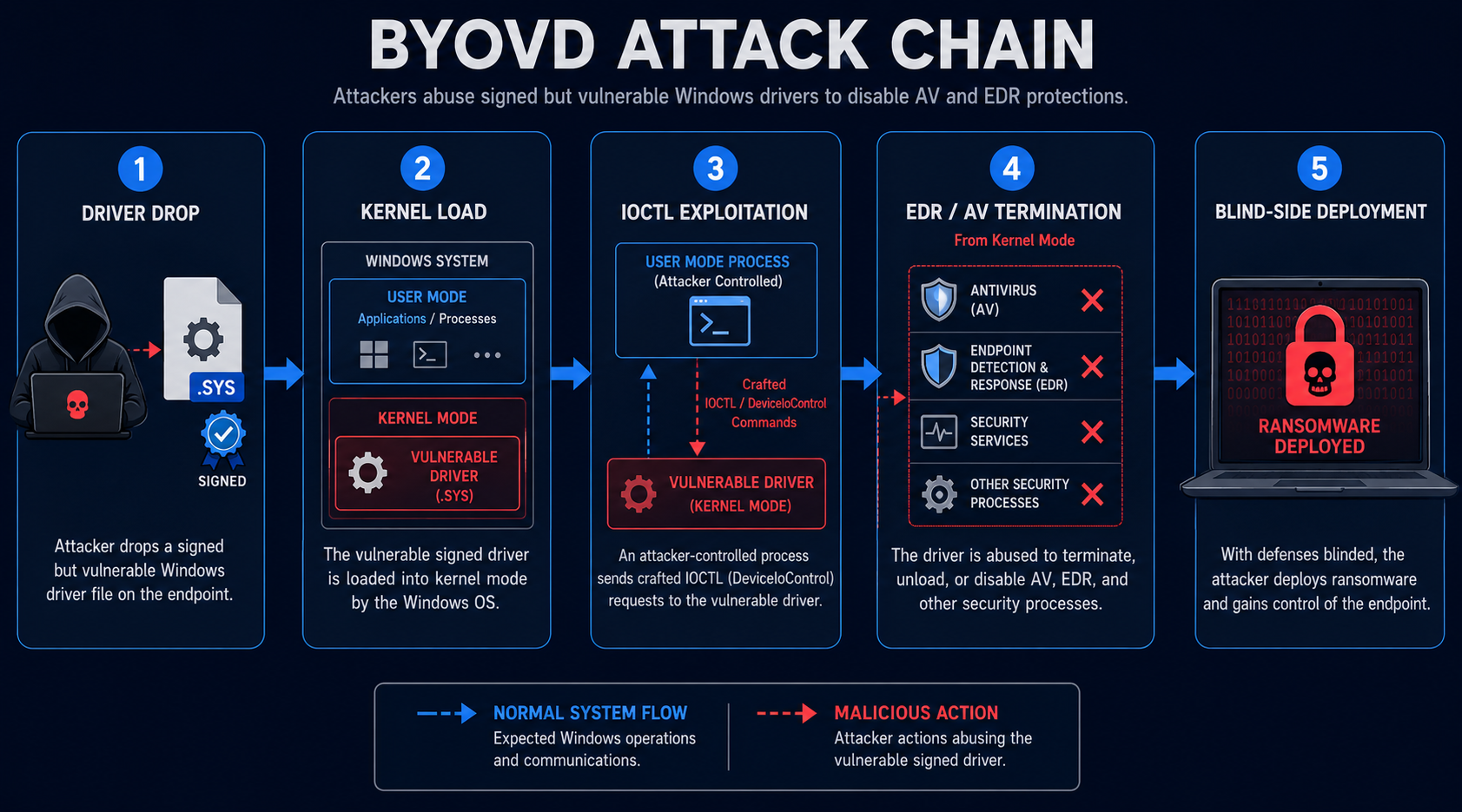
A BYOVD attack starts with administrative access. Attackers usually gain that access through compromised VPN credentials, phishing, exposed services, stolen accounts, or access brokers.
After that, they drop a signed vulnerable driver onto the target system. The driver may come from a legitimate vendor, a forensic tool, an old utility, or a hardware support package.
Next, the attacker loads the driver into kernel mode. Once the driver runs, the attacker sends crafted IOCTL requests from user mode. These requests instruct the driver to perform privileged operations.
Finally, the driver terminates or disrupts AV and EDR processes. With endpoint defenses blinded, the attacker deploys ransomware, steals data, or moves laterally with less visibility.
Stage One: Attackers Gain Administrative Access
BYOVD attacks usually require administrative privileges because loading a kernel driver is a privileged action.
Attackers often get this access before the driver appears. They may compromise VPN accounts, exploit a public-facing system, steal administrator credentials, or buy initial access.
At this point, endpoint security may still be active. The attacker has access, but defenders still have a chance to detect suspicious commands, privilege escalation, remote tools, and staging activity.
That window is critical. Once the vulnerable driver loads, the attacker may shut down the same telemetry defenders need for response.
Stage Two: Attackers Drop a Signed Vulnerable Driver
After gaining administrative access, attackers place a signed but vulnerable driver on the host.
The driver does not need to be current. It only needs to load. In several real incidents, attackers used old or revoked drivers because Windows still allowed them under certain trust conditions.
This creates a dangerous gap. A signature proves that a vendor signed the driver at some point. It does not prove that the driver remains safe today.
Attackers exploit that difference. They weaponize old trust decisions and turn legitimate drivers into kernel-level attack tools.
Stage Three: IOCTL Abuse Reaches the Kernel
Once the driver loads, attackers communicate with it through IOCTL requests. IOCTL stands for input and output control.
This interface lets user-mode programs send commands to the driver. In a legitimate product, those commands support hardware, diagnostics, or system management.
In a BYOVD attack, the same interface becomes a privilege bridge. The attacker asks the driver to perform actions that user-mode malware could not perform safely on its own.
That may include terminating protected processes, altering memory, removing callbacks, disabling security hooks, or interfering with monitoring.
Stage Four: Windows Drivers Kill AV and EDR in a Loop
Windows drivers kill AV and EDR most effectively when the malware runs a continuous kill loop.
A single process termination may not be enough. Many security products restart services automatically after failure. Attackers know this, so they repeatedly terminate targeted processes.
Some EDR killers contain lists of security product names and process identifiers. Others use broader techniques to locate and kill security processes dynamically.
This loop creates a dark zone on the endpoint. Even if a security service restarts, the driver-backed killer terminates it again before it can recover.
Stage Five: Ransomware Enters a Blind Environment
After the kill loop succeeds, the attacker deploys ransomware into a weakened environment.
At this stage, endpoint telemetry may disappear or become unreliable. The attacker can stage payloads, steal data, disable backups, move laterally, and launch encryption with fewer alerts.
Network telemetry becomes much more important. DNS logs, firewall logs, identity logs, proxy data, VPN logs, and cloud audit records may still show activity the endpoint can no longer report.
Security teams should treat an EDR-kill attempt as a ransomware countdown clock. If attackers try to blind defenses, encryption or data theft may be close behind.
How Windows Drivers Kill AV and EDR at Industrial Scale
The BYOVD ecosystem has matured. What once looked like advanced tradecraft now appears in ransomware operations, affiliate toolkits, and commodity EDR-killer frameworks.
Researchers have tracked dozens of EDR-killer tools that rely on vulnerable drivers. This shows that attackers have moved from one-off driver abuse to repeatable industrial-scale defense evasion.
The economics are simple. If ransomware runs while EDR remains active, defenders may stop the attack. If attackers kill EDR first, they increase the chance that encryption and extortion succeed.
This is why many ransomware groups now treat EDR killers as a standard pre-encryption step.
GentleKiller and the Gentlemen Ransomware Group
The Gentlemen ransomware group uses an EDR-killing framework called GentleKiller.
ESET research describes GentleKiller as an in-house framework with at least eight variants. Each variant abuses a different vulnerable or malicious kernel-level driver.
The group also integrates third-party EDR killers into its affiliate suite. This gives affiliates more options when one driver or tool fails.
This matters because it shows operational maturity. Gentlemen does not rely on a single driver. It maintains a defense-evasion ecosystem that can adapt across victim environments.
Qilin, Warlock, and Other BYOVD Operators
Qilin, Warlock, and other ransomware actors have also used BYOVD techniques to disable endpoint security before launching ransomware.
Some tools target large numbers of security products. Others focus on specific vendors or processes. Either way, the goal remains the same: remove detection before encryption begins.
Warlock-related reporting also points to AI-assisted development patterns in some EDR-killer code. If attackers use AI to produce or adapt these tools, the number of variants may grow faster.
That makes static detection harder. Defenders need behavioral rules that focus on the sequence of activity, not only known file hashes.
Real-World Windows Driver Attack Scenarios
In a SonicWall VPN scenario, attackers use compromised VPN credentials to enter a network. After landing on a host, they deploy an EDR killer that abuses a revoked EnCase forensic driver. The driver gives them kernel-level process termination capability, and the security stack goes dark before ransomware deploys.
In a malvertising scenario, a user clicks a malicious ad and installs a rogue remote access tool. The attacker then stages a vulnerable signed driver and uses it to terminate security tools. Afterward, ransomware or data theft activity proceeds with reduced endpoint visibility.
In a ransomware affiliate scenario, an operator receives an EDR-killer toolkit from the ransomware group. The affiliate loads the driver, runs the kill loop, confirms security processes remain down, and then launches the encryptor.
In a legitimate-driver abuse scenario, attackers target a driver from a trusted vendor. The driver may have a valid signature and low detection history, but it still exposes dangerous functionality. Once loaded, it becomes a weapon against protected processes.
Enterprise Impact of Windows Drivers Killing AV and EDR
Windows drivers kill AV and EDR in ways that directly affect enterprise security strategy.
Many organizations rely heavily on EDR telemetry during detection and incident response. If attackers disable that telemetry early, the investigation loses one of its most important evidence sources.
This creates a serious gap. The most important attack activity may happen during the period when endpoint telemetry is missing or incomplete.
Enterprises should plan for that reality. Incident response playbooks must assume that EDR may fail or disappear during a ransomware attack.
Why EDR Telemetry Alone Is Not Enough
EDR remains valuable, but it cannot be the only source of truth.
If attackers disable endpoint sensors, security teams need other data sources. Firewall logs, DNS records, authentication events, VPN logs, cloud audit logs, and network detection tools become critical.
These sources sit outside the compromised endpoint. Therefore, attackers may not be able to tamper with them as easily.
Security teams should build detection logic that correlates endpoint silence with network and identity anomalies. A sudden loss of EDR telemetry can itself become an alert signal.
Compliance and Mission-Critical Risk
Regulated and mission-critical environments face added risk when Windows drivers kill AV and EDR.
A blind window can affect incident timelines, evidence quality, reporting obligations, and recovery confidence. If attackers steal data while endpoint logs are missing, the organization may struggle to prove scope.
Healthcare, finance, government, legal, industrial, and critical infrastructure teams should treat EDR-kill activity as a high-severity incident milestone.
They should also preserve external logs quickly. Once ransomware deploys, time becomes limited.
How to Stop Windows Drivers From Killing AV and EDR

Stopping BYOVD attacks requires kernel-level hardening, identity controls, and detection sources beyond the endpoint.
Start with Microsoft’s Vulnerable Driver Blocklist. Then add Hypervisor-Protected Code Integrity, Windows Defender Application Control, remote access hardening, and network-based monitoring.
No single control stops every BYOVD attack. However, layered controls make the attack harder, noisier, and easier to detect.
For broader endpoint validation support, see Digital Warfare’s vulnerability assessment services.
Enable Microsoft’s Vulnerable Driver Blocklist
Microsoft’s Vulnerable Driver Blocklist blocks known abused drivers from loading.
Security teams should verify that the blocklist runs across all Windows endpoints. Do not assume it is active everywhere.
Older systems, unmanaged devices, and systems without modern security configuration may lack proper enforcement.
This control offers high value because it blocks many known BYOVD paths before the driver reaches kernel mode.
Enable HVCI to Harden Kernel Code Integrity
Hypervisor-Protected Code Integrity, also called HVCI, uses virtualization-based security to restrict what can run in kernel mode.
HVCI raises the cost of driver abuse. It helps enforce code integrity protections and limits some memory abuse techniques.
Organizations should deploy HVCI where hardware and compatibility allow it. They should test carefully in environments with legacy drivers or older applications.
Even when HVCI cannot run everywhere, it should protect high-value endpoints first.
Use WDAC for Driver Allowlisting
Windows Defender Application Control can enforce driver allowlisting. This gives organizations more control than a blocklist alone.
A blocklist blocks known bad or known abused drivers. An allowlist permits only approved drivers.
This approach works well for high-value systems, administrative workstations, servers, and critical operational environments.
WDAC requires planning and testing. However, it gives defenders a stronger answer to signed-driver abuse.
Monitor Driver Loads and Security Process Termination
Security teams should monitor kernel driver load events. They should also correlate those events with security process termination.
The most important pattern is sequence. A strange driver loads. Security processes terminate. Endpoint telemetry drops. Ransomware activity begins.
That sequence should trigger immediate response.
Teams should watch for new kernel services, unusual driver paths, suspicious filenames, unsigned or old drivers, and drivers from unexpected vendors.
Defend Remote Access Before BYOVD Starts
Many BYOVD incidents begin with remote access compromise.
VPN credentials, remote management tools, exposed services, and weak MFA create the first opening. Once attackers gain administrator access, they can attempt driver loading.
Security teams should enforce MFA on VPNs and remote access tools. They should also monitor impossible travel, unusual login times, new devices, and suspicious admin sessions.
Stopping the first access step prevents the driver stage from ever starting.
Do Not Depend Only on EDR During Response
Incident response teams should prepare for scenarios where EDR is already dead.
Run tabletop exercises that remove endpoint telemetry from the investigation. Then test whether the team can still detect, scope, and contain the incident.
Use firewall, DNS, proxy, authentication, cloud, backup, and SIEM logs to fill the gap.
This preparation matters because BYOVD attacks target the exact tool many teams depend on most.
Treat Tamper Protection as a Policy Requirement
Tamper protection still matters, even though BYOVD can bypass some user-mode defenses.
It raises the cost of simpler tampering attempts and forces attackers toward riskier kernel-level actions. Those actions can produce stronger detection signals if the environment monitors driver loads.
Organizations should treat disabled tamper protection as a policy violation. Ticket it, investigate it, and report repeat failures to leadership.
Tamper protection is not enough by itself, but it remains an important layer.
Build SIEM Rules for BYOVD Behavior
Security teams should build SIEM rules that connect driver load events with suspicious process terminations.
Useful signals include unexpected driver installation, new kernel service creation, AV or EDR process shutdown, stopped security services, sensor silence, and suspicious remote access activity.
Correlating these signals gives defenders a better chance to catch the attack before encryption starts.
For related Windows security control validation, see Digital Warfare’s penetration testing services
Broader Security Lessons From BYOVD Attacks
The BYOVD trend confirms that the signed-equals-trusted model is not enough.
A driver signature proves origin at signing time. It does not prove the driver is safe forever. Old, signed drivers can still contain dangerous control interfaces.
The trend also shows that EDR is now a target, not only a tool. Attackers understand that defenders rely on endpoint telemetry, so they attack that visibility first.
Finally, AI-assisted development may accelerate EDR-killer variants. Defenders should expect more tools, more driver combinations, and faster adaptation.
Why Signed Drivers Still Create Risk
Windows trusts signed drivers because legitimate vendors need kernel access for hardware and system functions.
However, that trust creates risk when old drivers expose dangerous features. Attackers do not need to break Windows signing if they can abuse something Windows already trusts.
This is why blocklists, allowlists, HVCI, and driver inventory all matter.
Security teams should know which drivers run in their environment and remove unnecessary legacy drivers.
Why EDR Kill Attempts Mean Ransomware Is Close
An EDR-kill attempt is not routine noise. It often signals that attackers are preparing for final-stage activity.
If attackers try to blind endpoint protection, they may be minutes or hours away from ransomware deployment, data theft, or destructive action.
Response teams should treat this as an emergency milestone. They should isolate affected hosts, preserve external logs, disable compromised accounts, and hunt for lateral movement immediately.
Speed matters because the attacker has already shifted from access to impact preparation.
Key Takeaway on Windows Drivers Kill AV and EDR
Windows drivers kill AV and EDR by abusing the kernel-level trust Windows gives to signed third-party drivers.
Attackers load old, vulnerable, or revoked drivers. Then they send crafted IOCTL commands to terminate security processes, blind endpoint telemetry, and prepare for ransomware deployment.
Researchers have documented dozens of EDR-killer tools that rely on BYOVD. Ransomware groups now use these tools as standard defense-evasion infrastructure.
Defenders should enable Microsoft’s Vulnerable Driver Blocklist, deploy HVCI where possible, use WDAC allowlisting for high-value systems, monitor driver load events, enforce MFA on remote access, and prepare incident response plans for EDR failure.
What Organizations Should Do Now
Start by verifying Microsoft’s Vulnerable Driver Blocklist across every Windows endpoint.
Next, enable HVCI on systems that support it. Prioritize administrator workstations, servers, and high-value endpoints.
Deploy WDAC driver allowlisting where feasible. Begin with sensitive systems and expand after testing.
Monitor driver load events, new kernel services, and security process termination patterns.
Strengthen VPN and remote access controls with MFA, conditional access, and alerting.
Finally, run a ransomware tabletop exercise where EDR telemetry disappears. Identify what logs remain and how the team would contain the incident.
For the one external source in this article, review ESET Research’s report: EDR Killers Explained: Beyond the Driver
Frequently Asked Questions About Windows Drivers Kill AV and EDR
What Does It Mean When Windows Drivers Kill AV and EDR?
It means attackers abuse a signed vulnerable Windows driver to terminate or disable antivirus and endpoint detection tools from kernel mode. This bypasses many user-mode tamper protections.
What Is BYOVD?
BYOVD means Bring Your Own Vulnerable Driver. Attackers bring a legitimate but flawed driver to the target system, load it into kernel mode, and exploit it to perform privileged actions.
Why Do Attackers Use Windows Drivers Against EDR?
Attackers use Windows drivers because kernel-mode code can perform actions that user-mode malware cannot. This lets them terminate protected security processes and blind endpoint telemetry.
Which Ransomware Groups Use BYOVD Techniques?
Public research has linked BYOVD and EDR-killer techniques to ransomware groups including Gentlemen, Qilin, Warlock, and other active operators.
Can Microsoft’s Vulnerable Driver Blocklist Stop BYOVD?
The blocklist can stop many known abused drivers from loading. However, it should not stand alone. Defenders should combine it with HVCI, WDAC, driver monitoring, and remote access hardening.
What Signals Show That Windows Drivers Killed AV and EDR?
Key signals include unexpected driver loads, new kernel services, security process termination, stopped EDR services, sudden sensor silence, and ransomware activity shortly after driver installation.
How Should Organizations Defend Against BYOVD?
Organizations should enable Microsoft’s Vulnerable Driver Blocklist, use HVCI where possible, deploy WDAC driver allowlisting, enforce MFA on remote access, monitor driver loads, and build SIEM rules around security process termination.
Why Is EDR Telemetry Not Enough?
EDR telemetry may disappear if attackers kill the endpoint sensor. Security teams need firewall, DNS, identity, proxy, cloud, and SIEM logs to continue detection and response when endpoint visibility fails.

