

Introduction
The FortiBleed attack has become one of the most serious Fortinet credential exposure events reported in 2026. Security researchers and government agencies have warned that internet-facing Fortinet FortiGate firewalls and VPN gateways have been targeted through compromised credentials, brute-force attempts, credential stuffing, and recycled access data from prior incidents.
The most widely reported figures vary. Some reports reference approximately 74,000 exposed Fortinet devices, while other threat intelligence reporting places the number at 86,644 FortiGate devices across 194 countries. Either way, the impact is serious enough that any organization running an internet-facing Fortinet firewall or VPN gateway should treat credential exposure as a live risk until passwords are rotated, MFA is enforced, firmware is current, and device logs are reviewed.
This is not a simple zero-day story. The FortiBleed attack is better understood as a credential compromise campaign. Attackers appear to have used a mix of reused credentials, brute-force activity, dictionary attacks, credential stuffing, and historical exposure from prior Fortinet incidents. That makes the response different from a normal patch-and-move-on vulnerability. Organizations must reset credentials, terminate sessions, harden access, review configuration, and look for evidence of unauthorized activity.
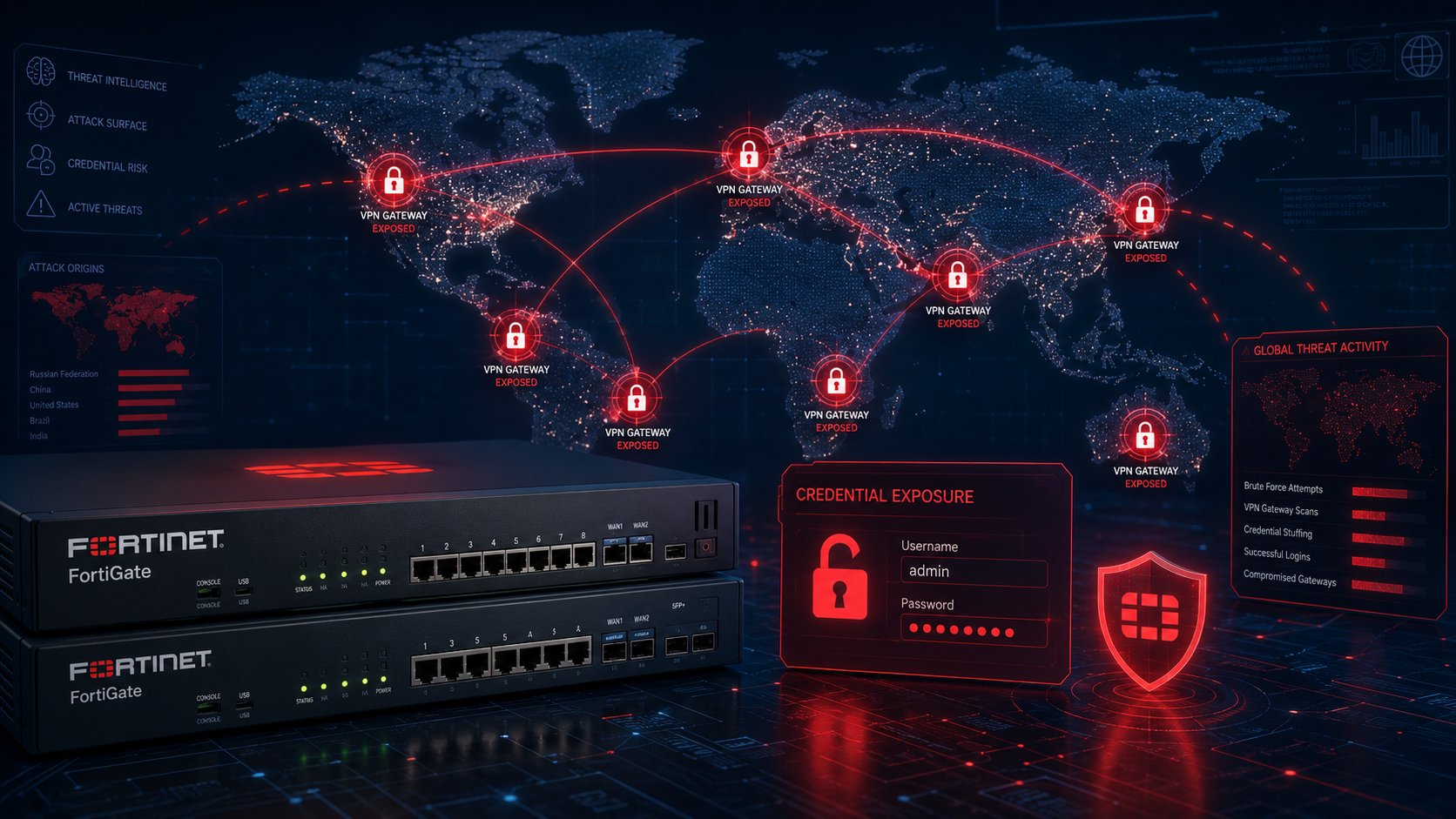
Why the FortiBleed Attack Demands Immediate Action
The urgency comes from the type of access involved. Firewall and VPN credentials are not ordinary passwords. They protect the edge of the network. If attackers gain working administrator or VPN access, they may be able to enter the environment, change security settings, create persistence, inspect traffic, or move toward internal systems.
This level of urgency mirrors what Digital Warfare recently covered in the Splunk Enterprise vulnerability breakdown, where exposed infrastructure and rapid attacker movement created a compressed response window for defenders.
The lesson is clear. Edge devices must be treated as high-value identity systems, not just network appliances. If an attacker owns the firewall or VPN gateway, they may own the path into everything behind it.
What Is the FortiBleed Attack
The FortiBleed attack is a large-scale credential compromise campaign affecting Fortinet FortiGate firewalls and VPN gateways. The campaign involves exposed or compromised credentials associated with internet-facing Fortinet devices. These credentials may allow attackers to log in through administrator portals or VPN services if organizations have not reset passwords, enforced MFA, or hardened access controls.
The name FortiBleed refers to the exposure of working firewall and VPN credentials from devices that many organizations believed were secure. Unlike a single software vulnerability, FortiBleed combines credential reuse, exposed services, weak password hygiene, absent MFA, and historical credential risk.
This distinction matters. A normal CVE-driven incident can often be reduced by applying a specific patch. FortiBleed requires a broader response because the core issue is access. If valid credentials have been exposed, patching alone does not remove the risk.
Why the FortiBleed Attack Worked at Such Scale
The attack worked at scale because internet-facing VPN and firewall services are attractive targets. Attackers can scan the internet, identify exposed Fortinet systems, test credentials, automate login attempts, and verify which accounts still work.
Credential-based attacks are especially difficult because successful logins can look legitimate. A firewall may simply record that a user authenticated. If the password is valid and MFA is not enforced, the attacker may not need malware, exploits, or obvious brute-force noise during the final access stage.
This is why MFA is critical. A stolen or cracked password should not be enough to access an administrator portal or VPN gateway. Organizations that rely on password-only access are at significantly higher risk.
FortiBleed Attack Scale by the Numbers
The reported scale varies across sources, but the numbers remain serious. CISA has referenced approximately 74,000 Fortinet devices associated with leaked credentials, while SOCRadar and other reporting reference 86,644 FortiGate devices across 194 countries.
The dataset has also been described as affecting more than 21,000 domains and organizations across multiple sectors. Named companies have appeared in some public reporting, but organizations should avoid assuming they are safe simply because their name has not appeared in an article. Credential leaks often circulate privately before they are publicly discussed.
The safest position is operational caution. If your organization runs Fortinet FortiGate firewalls, Fortinet VPN gateways, or internet-facing Fortinet management services, you should validate exposure immediately.
When and How the FortiBleed Attack Was Found
The FortiBleed campaign became widely discussed in mid-June 2026 after researchers reported a large dataset of Fortinet-related credentials and affected firewall URLs. Government agencies and security vendors then issued guidance urging organizations to reset credentials, enable MFA, harden Fortinet devices, and review logs.
The public timeline includes researcher discovery, threat intelligence analysis, government advisories, and Fortinet’s own response guidance. Because some details differ between sources, defenders should focus less on the exact public count and more on the immediate operational question: could your Fortinet credentials be exposed, reused, or valid for internet-facing access?
If the answer is uncertain, treat the device as exposed until proven otherwise.
How the FortiBleed Attack Works Step by Step
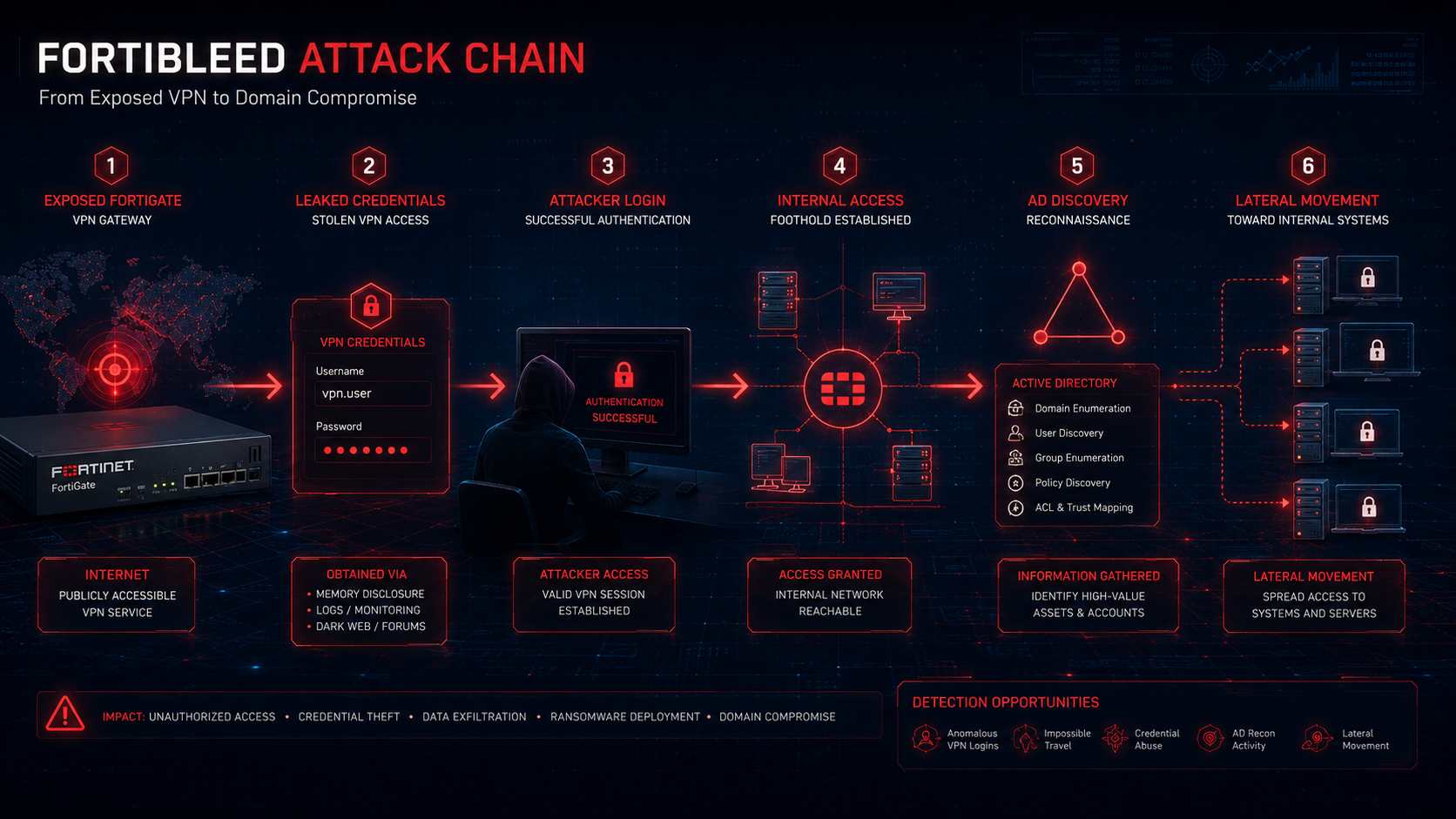
The FortiBleed attack begins with discovery. Attackers identify internet-facing Fortinet firewalls and VPN portals using automated scanning. Exposed login interfaces become the first target because they provide a direct path to administrator or VPN authentication.
Next, attackers test credentials. These may come from prior breaches, credential reuse, password lists, brute-force attempts, dictionary attacks, or other exposed data sources. If MFA is missing, a working password may be enough to gain access.
After access is confirmed, attackers may use the firewall or VPN gateway as a bridge into the internal environment. From there, they can review configuration, inspect routes, identify reachable systems, test internal authentication, and attempt lateral movement.
The final stage depends on the attacker’s objective. Some may sell access. Others may use it for espionage, ransomware preparation, data theft, or long-term persistence.
Why the FortiBleed Attack Has No Single CVE Number
FortiBleed is not driven by one confirmed new software flaw. It is a campaign built around credential exposure and credential abuse. That is why there is no single CVE that fully explains or fixes the issue.
This is important for defenders. A patch may reduce future risk, but it does not automatically invalidate credentials already exposed or tested by attackers. If a password has been leaked, cracked, reused, or confirmed as working, the only safe response is to rotate it and enforce stronger authentication.
A full response requires credential resets, MFA, firmware upgrades, session termination, configuration review, log analysis, and exposure reduction.
Why the FortiBleed Attack Puts Every Business at Risk
This campaign does not only affect large enterprises. Any organization with an internet-facing Fortinet firewall or VPN gateway may be exposed if credentials are weak, reused, leaked, or not protected by MFA.
Large enterprises face risk because FortiGate devices often sit at critical network boundaries. They may protect offices, cloud links, data centers, remote workers, and privileged administrative paths. If attackers gain access, they may have a direct route into sensitive systems.
Small and mid-size businesses face risk because they often rely on a single firewall or VPN gateway as their main perimeter control. If that device is compromised, they may not have enough layered monitoring to spot what happens next.
Hybrid networks face additional risk because VPN credentials may expose both on-premises systems and cloud-connected resources. A firewall that links office networks, cloud workloads, and remote users can become a high-value pivot point.
For more context on how credential theft supports stealthy movement through networks, see Digital Warfare’s GammaWorm malware analysis.
How the FortiBleed Attack Hits Large Enterprises
Large enterprises may have multiple FortiGate appliances across regions, business units, and data centers. That creates operational complexity. One forgotten VPN portal, one old administrator account, or one reused password can become the weak point.
The danger is not limited to the firewall itself. Once attackers authenticate, they may identify internal routes, VPN user groups, administrator permissions, policy objects, and connected systems. They may also use the firewall as a staging point for further reconnaissance.
Enterprises should treat every internet-facing Fortinet device as a critical asset and verify that access is locked down by MFA, trusted source restrictions, current firmware, and strong credential management.
How the FortiBleed Attack Hits Small and Mid-Size Businesses
Smaller businesses may be hit harder because they often lack a full security operations team. A working VPN login may remain unnoticed for days or weeks if no one is actively reviewing logs.
Many SMBs also use managed service providers for firewall administration. That can be secure when done properly, but it introduces risk if shared administrator accounts, weak remote access controls, or reused credentials exist across customer environments.
For SMBs, the response should be direct and practical. Reset all Fortinet admin and VPN credentials. Enable MFA. Remove public management access. Review all firewall users. Check VPN logs. Confirm firmware is supported and current.
Cloud and Hybrid Network Risk From the FortiBleed Attack
Cloud-connected environments can expand the blast radius of FortiBleed. If FortiGate VPN access reaches cloud management networks, private subnets, identity systems, backup platforms, or administrative jump hosts, attackers may be able to move beyond the firewall quickly.
Hybrid environments also make log review more complex. Evidence may appear in FortiGate logs, identity provider logs, cloud access logs, endpoint telemetry, DNS records, and SIEM alerts. Defenders need to correlate activity across these sources instead of reviewing the firewall in isolation.
A firewall compromise should trigger a broader review of cloud access, identity access, and privileged sessions.
Financial and Legal Exposure
Any confirmed credential exposure can create legal, financial, and operational consequences. If attackers used VPN or administrator credentials to access regulated data, customer systems, financial records, healthcare data, or government-connected environments, notification obligations may apply.
Forensic review can also become expensive because edge devices sit at the boundary between external attackers and internal systems. Once the firewall or VPN gateway is no longer trusted, responders must determine what the attacker could access behind it.
The business risk is simple. A firewall is not only a control. It is also a target. When attackers compromise the control, the protected environment may become exposed.
Real-World FortiBleed Attack Scenarios
One realistic scenario involves a leaked administrator password being sold on a criminal forum. A ransomware affiliate buys the access, logs in through the firewall, identifies internal systems, and begins staging tools for lateral movement. The attack begins with one valid password and escalates into a full network compromise.
Another scenario involves a state-linked actor using exposed VPN credentials to enter a government or defence-related network. Because the login uses a valid password, the first access attempt may look routine. The attacker then moves slowly, maps systems, and searches for sensitive files.
A third scenario involves a managed service provider. If an MSP uses shared or poorly protected firewall administration practices, one compromised Fortinet credential can create risk across multiple customers.
A fourth scenario involves incomplete remediation. A company upgrades firmware but does not reset passwords. If the old credentials are already exposed, the upgrade may reduce future vulnerability risk but will not stop attackers from using passwords they already have.
A fifth scenario involves cloud access. A VPN account exposed through FortiBleed may allow access to hybrid cloud resources. From there, attackers may search for API keys, cloud tokens, backups, and administrative interfaces.
How to Find Signs of a FortiBleed Attack on Your Network
Detection is harder than normal because credential-based access can appear legitimate. However, defenders can still look for signs of abuse.
Organizations should review FortiGate administrator logs, VPN logs, SSL VPN session records, configuration changes, new user accounts, unexpected policy edits, and login events from unfamiliar IP addresses or unusual geographic regions.
Defenders should also review the period around the public reporting window and any earlier dates tied to suspicious authentication. If your organization finds unusual logins, treat the event as a potential compromise and expand the investigation beyond the firewall.
For a deeper look at endpoint and privilege escalation risk after initial access, see Digital Warfare’s RoguePlanet exploit breakdown.
Check Whether Your Devices May Be Exposed
Organizations should check vendor guidance, government advisories, threat intelligence portals, and available exposure-checking tools to determine whether their domains or devices appear in known FortiBleed-related reporting.
However, absence from a public checker should not be treated as proof of safety. Credential datasets can be incomplete, privately traded, duplicated, or updated. The safer approach is to rotate credentials and enforce MFA regardless of whether your organization appears in one public dataset.
If your Fortinet device is internet-facing, password-only, or not recently reviewed, treat it as high priority.
Log Review for Signs of FortiBleed Activity
Review administrator logins from unfamiliar IP addresses, unusual countries, unexpected times, and accounts that should no longer be active. Look for changes to firewall policies, VPN settings, routing rules, user accounts, administrator profiles, and trusted hosts.
Review SSL VPN sessions for unusual duration, unexpected source locations, large traffic volumes, or access to systems the user does not normally reach. Correlate VPN activity with internal authentication logs to see whether the same account attempted lateral movement after connecting.
Any unexpected configuration change should be treated seriously. Attackers with firewall access may create accounts, alter rules, weaken logging, or open paths for future access.
SIEM and EDR Rules to Build for FortiBleed Detection
SIEM detections should alert on FortiGate administrator logins from IP addresses outside approved management ranges. They should also alert on new administrator accounts, changes to VPN settings, disabled security features, unusual SSL VPN traffic, and suspicious configuration exports.
EDR and identity detections should watch what happens after a VPN login. A suspicious VPN session followed by Active Directory enumeration, password spraying, remote service creation, or abnormal access to file servers should be escalated immediately.
Detection should focus on the full chain. The firewall login is only the first signal. The internal activity that follows may reveal the attacker’s real objective.
Threat Hunting Steps for the FortiBleed Attack
Threat hunters should search for unusual VPN sessions, unexpected administrator activity, suspicious changes to FortiGate configuration, unknown local users, modified trusted host settings, and unexplained policy changes.
They should also review internal systems for signs of reconnaissance after VPN access. This includes directory enumeration, LDAP queries, SMB scanning, failed login bursts, remote desktop attempts, and access to sensitive file shares.
Threat hunting should also include service accounts and privileged accounts. If attackers used firewall or VPN access to reach internal systems, privileged credentials may have been exposed or targeted.
How to Respond to a FortiBleed Attack on Your Network
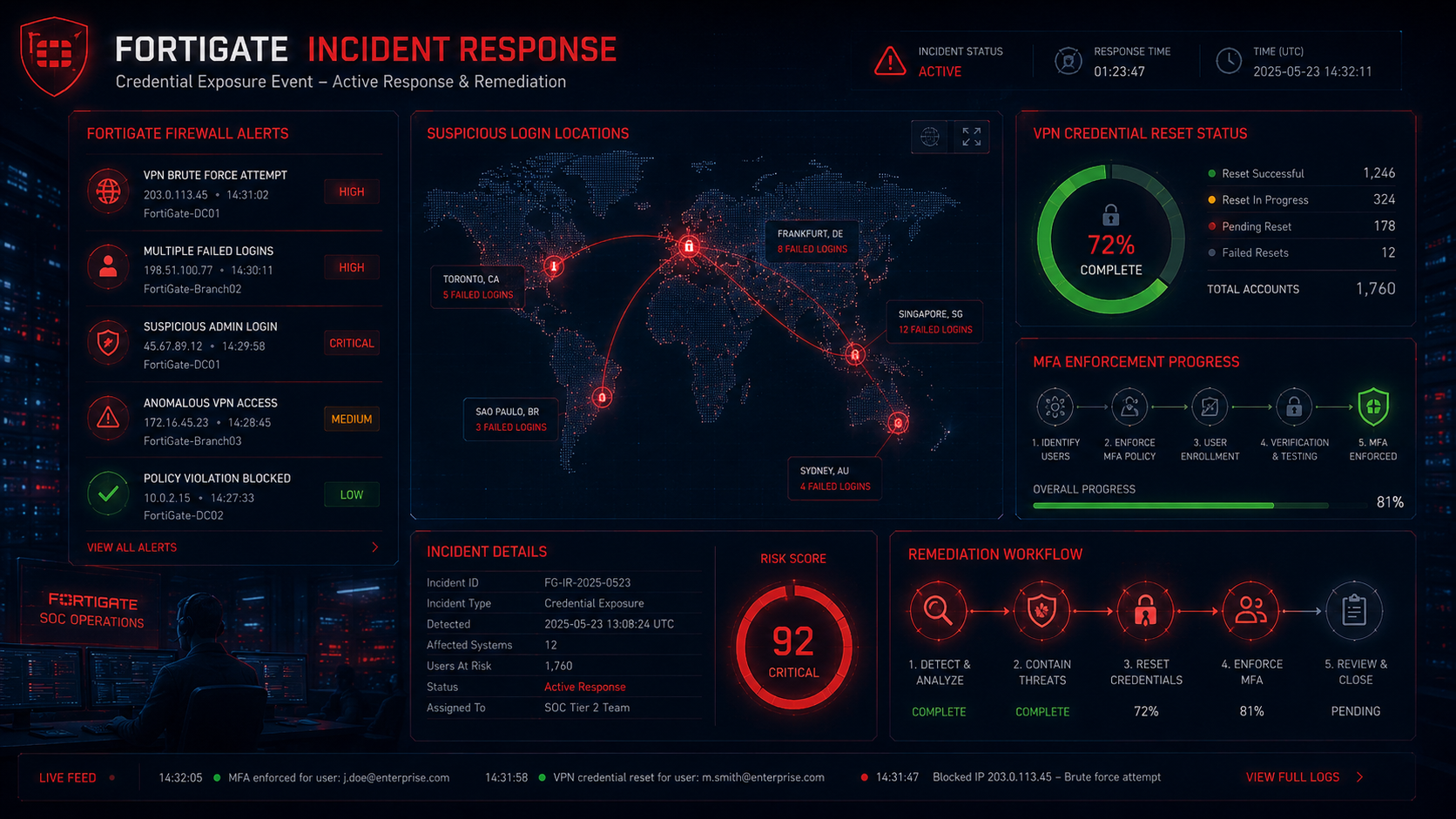
Organizations should respond quickly and in the correct order. The first step is to terminate active administrative and VPN sessions. This reduces the chance that an attacker remains connected while credentials are being changed.
Next, reset every Fortinet administrator and VPN password. Use strong, unique credentials and prioritize internet-facing systems. Do not reuse old passwords or shared administrative credentials.
After that, enable MFA on every administrator and VPN account. Password-only access should not remain available on internet-facing Fortinet services.
Then upgrade FortiOS to supported current versions. Fortinet recommends current releases in the 7.4, 7.6, or 8.0 branches and notes that these versions support PBKDF2 hashing of administrator credentials.
Finally, review configuration, logs, user accounts, firewall rules, VPN portals, administrator profiles, and trusted host restrictions. Only take a clean backup after the device has been reviewed and hardened.
For the one external source in this article, review Fortinet’s official response: Analysis of Reported Credential Compromise of FortiGate Devices.
End All Sessions and Reset Every Password
The first response action is session termination. Active administrator and VPN sessions should be ended immediately so no unauthorized session remains open during remediation.
After that, reset all Fortinet VPN and administrator passwords. Prioritize internet-facing systems, externally managed devices, privileged administrator accounts, and any accounts used by third-party providers.
Every password should be unique, strong, and stored securely. Shared firewall administrator accounts should be removed wherever possible because they make investigation and accountability harder.
Turn On MFA for Every Account
MFA should be enabled for every Fortinet administrator and VPN account. This is one of the most important controls against credential-based access. A stolen password should not be enough to authenticate.
Where possible, use strong MFA methods such as hardware-backed authenticators or phishing-resistant authentication. Avoid weaker legacy access paths that allow users to bypass MFA.
After enabling MFA, test it. Confirm every administrator and VPN user is actually protected before considering the device secure.
Upgrade FortiOS and Improve Credential Protection
Firmware should be upgraded to supported current FortiOS versions. Fortinet recommends upgrading to current versions in the 7.4, 7.6, or 8.0 branches, which support PBKDF2 hashing of administrator credentials.
Upgrading is important, but it should not be the only action. If credentials have already been exposed, attackers may still be able to use them unless passwords are reset and active sessions are terminated.
A safe response combines firmware upgrades, credential rotation, MFA enforcement, and configuration review.
Remove Internet Exposure From Management Interfaces
FortiGate management interfaces should not be exposed to the public internet unless there is a strong business need and strict compensating controls. Administrative access should be limited to trusted management networks, VPN-protected paths, jump hosts, or approved IP ranges.
Reducing exposure lowers the chance that attackers can attempt direct logins, credential stuffing, brute force, or automated reconnaissance against the management plane.
Public-facing SSL VPN services should also be reviewed. If they are required, enforce MFA, monitor sessions, and limit access by user role and policy.
Review and Clean Your FortiGate Configuration
After credentials are reset and access is restricted, review the configuration. Look for unknown users, rogue administrator accounts, unexpected firewall rules, suspicious VPN settings, changed routing, modified trusted hosts, and disabled security features.
Review configuration backups carefully. Do not assume the latest backup is clean if the compromise window is unknown. Create a new clean backup only after the device has been validated.
If suspicious changes are found, expand the investigation to internal systems. Firewall access may have allowed attackers to reach other parts of the network.
What the FortiBleed Attack Tells Us About the Threat Landscape
FortiBleed is not only a Fortinet story. It reflects a wider shift toward credential-first attacks against edge infrastructure. Attackers know that firewalls, VPN gateways, identity systems, and remote access portals are high-value targets.
The perimeter has changed. It is no longer enough to patch servers and scan endpoints. Security teams must continuously validate edge devices, remote access systems, identity controls, and administrative paths.
For organizations that want to validate real-world exposure, Digital Warfare’s penetration testing services can help identify exploitable paths before attackers use them.
Legacy Credentials Are a Hidden Risk
Legacy credentials create long-term exposure. A password may have been created years ago, reused across systems, stored in an old backup, shared with a vendor, or captured in a prior incident. If that password still works today, it remains dangerous.
Password rotation is not a paperwork exercise. It is a containment control. After a credential exposure event, old passwords must be treated as compromised.
Organizations should also review service accounts, local administrator accounts, vendor accounts, emergency access accounts, and forgotten VPN users.
Initial Access Brokers Benefit From Firewall Exposure
Valid firewall and VPN credentials are valuable to criminals. Initial access brokers can sell them to ransomware groups, espionage actors, and fraud crews. This means the risk may continue even after the first public report fades.
A leaked credential may be copied many times. It may be sold privately, tested by multiple actors, or stored for later use. That is why fast password rotation and MFA enforcement are essential.
If an organization delays, someone else may use the same credential before the response is complete.
Silent Credential Access Defeats Perimeter-Only Security
Credential-based attacks can bypass many traditional controls. If the attacker logs in with a valid username and password, the event may look normal unless defenders monitor source location, device fingerprint, session behavior, and post-login activity.
Perimeter-only security is not enough. Organizations need layered visibility across identity, endpoint, network, firewall, VPN, and cloud activity.
The real detection opportunity often appears after login. Watch for unusual internal access, abnormal file access, privilege escalation, policy changes, and reconnaissance.
MFA Can Stop Many FortiBleed-Style Attacks
MFA is one of the strongest practical defenses against credential exposure. Even if a password is leaked, cracked, guessed, or reused, MFA can prevent direct account takeover.
However, MFA must be enforced consistently. It should cover administrators, VPN users, third-party support accounts, and privileged access paths. Exceptions should be rare, documented, and temporary.
For internet-facing network devices, MFA should be considered mandatory.
Key Takeaway on the FortiBleed Attack
The FortiBleed attack shows why firewall and VPN credentials must be protected like crown jewels. These accounts sit at the edge of the business. If attackers gain access, they may be able to step directly into the internal network.
The exact public count varies by source, but the risk is clear. Tens of thousands of Fortinet devices are associated with exposed credentials, and organizations should respond as if password-based access may already be compromised.
The safest response is to terminate sessions, reset credentials, enforce MFA, upgrade FortiOS, remove public management exposure, and review logs and configuration for evidence of unauthorized access.
What to Do Right Now
Terminate all active FortiGate administrator and SSL VPN sessions immediately. Reset every administrator and VPN password using strong, unique credentials.
Enable MFA on every administrator and VPN account. Remove or disable accounts that are no longer required.
Upgrade FortiOS to a current supported release and confirm administrator credential protection has improved through supported hashing mechanisms.
Remove public exposure from management interfaces and restrict administration to trusted networks, jump hosts, or approved IP ranges.
Review logs, configuration changes, VPN sessions, firewall policies, user accounts, and internal authentication activity for signs of unauthorized access.
Treat any confirmed suspicious login as a broader incident. Investigate internal systems, rotate privileged credentials, and continue monitoring for follow-on activity.
Frequently Asked Questions About the FortiBleed Attack
What Is the FortiBleed Attack?
The FortiBleed attack is a large-scale credential compromise campaign affecting Fortinet FortiGate firewalls and VPN gateways. It involves exposed, reused, or compromised credentials that may allow attackers to access internet-facing Fortinet devices.
How Many Fortinet Devices Were Affected?
Public figures vary. CISA references approximately 74,000 Fortinet devices associated with leaked credentials, while SOCRadar and other reporting reference 86,644 devices across 194 countries. Organizations should focus on exposure validation and remediation rather than relying only on the public count.
Does the FortiBleed Attack Use a New Vulnerability?
FortiBleed is not best understood as a single new vulnerability. It is a credential abuse campaign involving exposed credentials, weak password hygiene, credential stuffing, brute-force activity, and historical credential exposure.
Why Is FortiBleed So Dangerous?
FortiBleed is dangerous because firewall and VPN credentials can provide direct access to the network edge. If attackers log in successfully, they may be able to alter settings, inspect access paths, create persistence, or move toward internal systems.
How Should Businesses Respond to FortiBleed?
Businesses should terminate active sessions, reset all Fortinet administrator and VPN passwords, enforce MFA, upgrade FortiOS, remove public management exposure, and review logs and configuration for suspicious activity.
What Should Security Teams Hunt For?
Security teams should hunt for unusual administrator logins, unknown VPN sessions, new users, unexpected firewall rule changes, modified routing, unfamiliar source IPs, suspicious configuration exports, and internal reconnaissance after VPN access.

