Introduction
The RoguePlanet exploit abuses a race condition inside Microsoft Defender’s scanning engine and can lead to SYSTEM-level access on patched Windows systems. Microsoft has assigned the issue CVE-2026-50656 and describes it as an elevation of privilege vulnerability in the Microsoft Malware Protection Engine. At the time of writing, Microsoft says it is working to provide a security update.
This matters because Microsoft Defender is not a niche tool. It runs across a massive number of Windows endpoints by default and often remains active even when organisations use third-party endpoint security platforms. When a flaw affects the security engine itself, defenders need to treat it differently from a normal application bug.
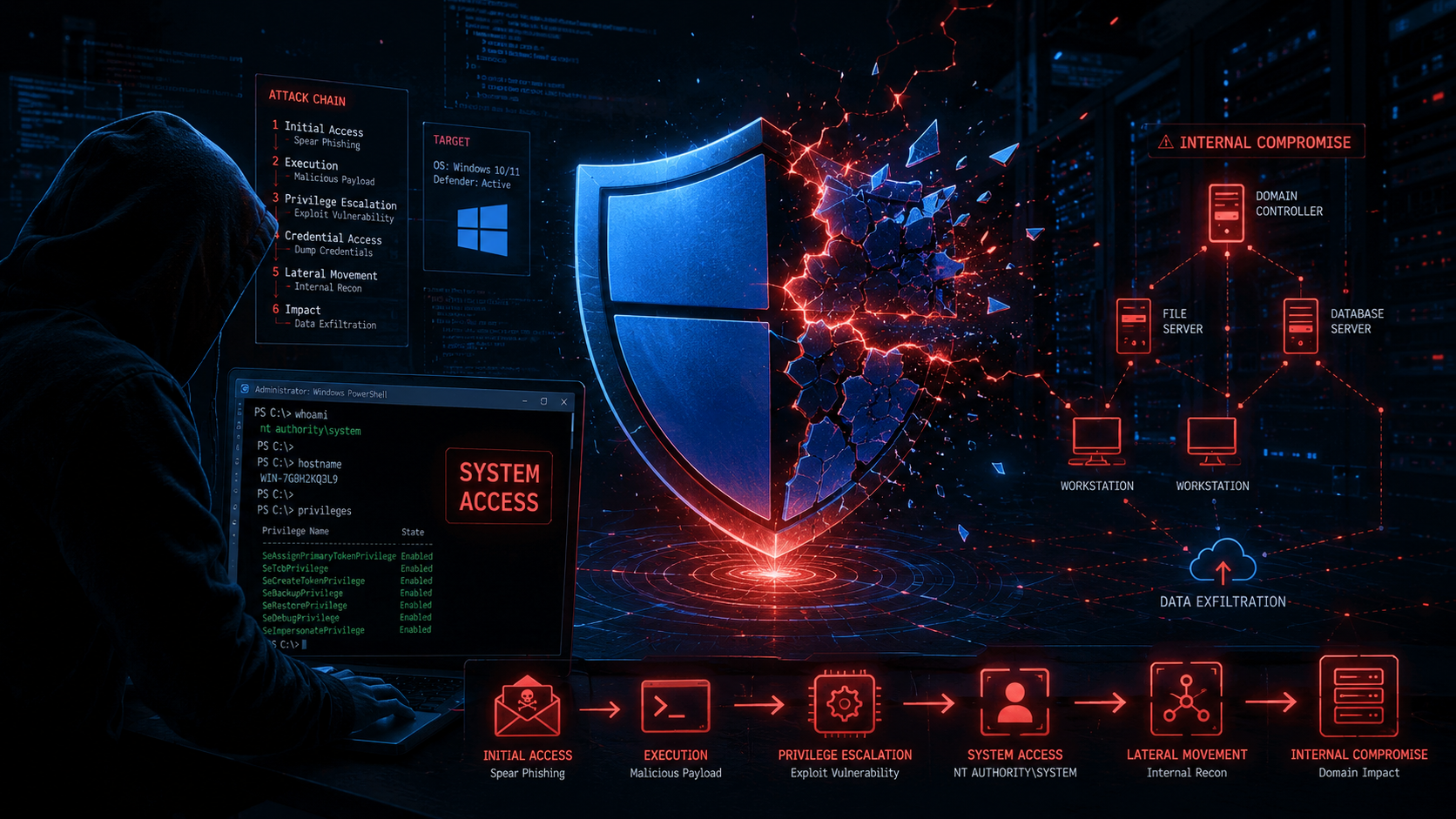
The danger is practical. If an attacker already has a foothold on a Windows 10 or Windows 11 system, RoguePlanet may help them move from limited user access to SYSTEM-level control. That level of access can allow deeper tampering, credential theft, security tool interference, persistence, and lateral movement.
This RoguePlanet exploit threat mirrors the pattern we saw with the Splunk Enterprise flaw, where public exploit activity and critical security tooling exposure created an urgent response window. For related context, see Digital Warfare’s analysis of the Splunk Enterprise vulnerability CVE-2026-20253.
What Is the RoguePlanet Exploit
The RoguePlanet exploit is a publicly discussed proof of concept targeting Microsoft Defender’s malware scanning behavior. The issue is tracked as CVE-2026-50656 and affects the Microsoft Malware Protection Engine used by Microsoft Defender.
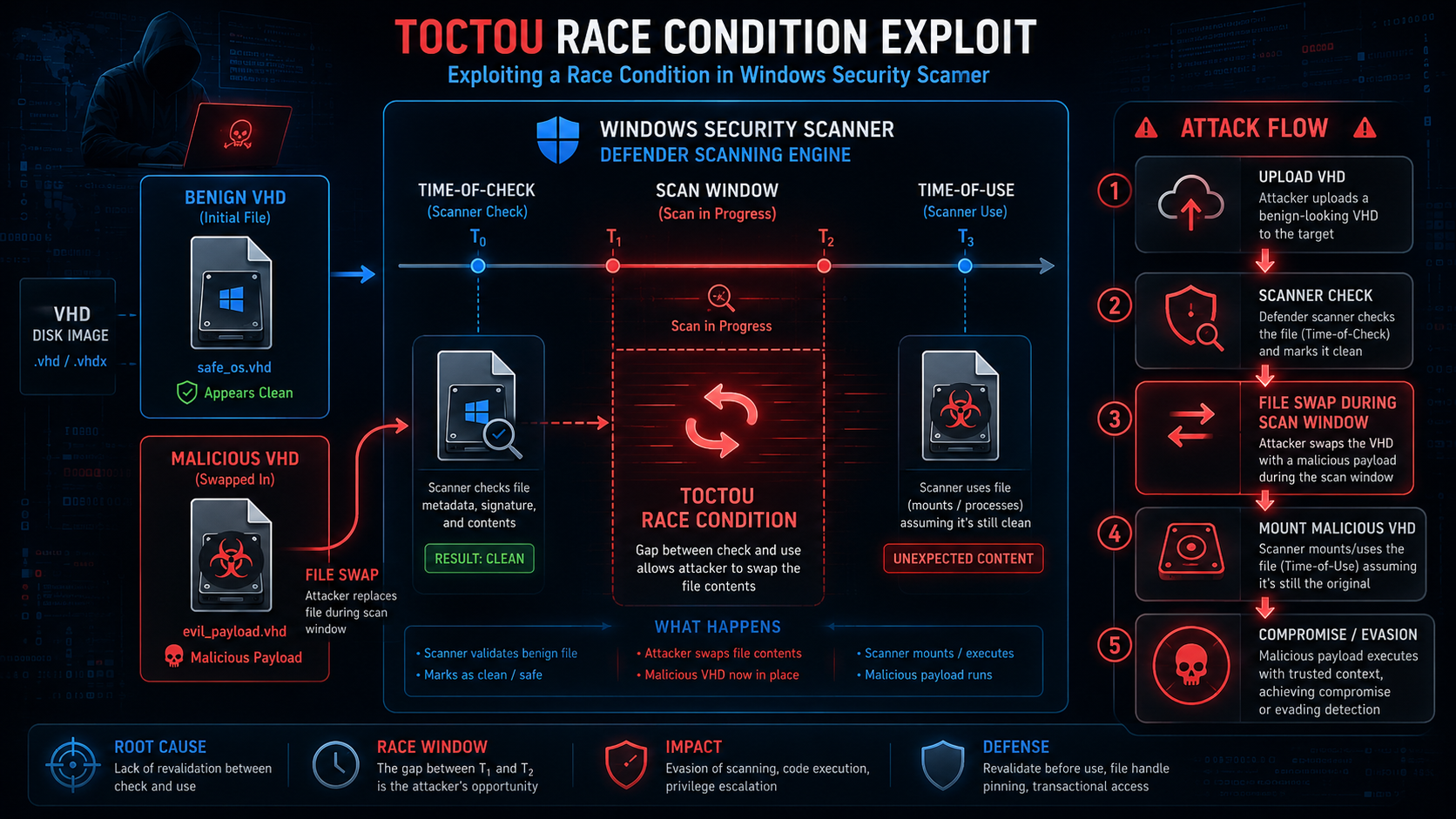
The exploit is described as a race condition and improper link resolution issue. In practical terms, the attacker attempts to take advantage of a timing gap between when Defender checks a file and when it later acts on that file. If the attacker wins that race, the trusted Defender process can be tricked into performing actions that help elevate privileges.
The most serious reported outcome is a command shell running with NT AUTHORITY\SYSTEM privileges. SYSTEM is one of the highest privilege levels on Windows. Once an attacker reaches that level, the endpoint is effectively under their control.
Why the RoguePlanet Exploit Has No Patch Yet
Microsoft has acknowledged CVE-2026-50656 and says it is working to provide a security update. Until that update is available and deployed, organisations need to rely on compensating controls, endpoint monitoring, application control, and user restrictions.
This is why the exploit is urgent even though it is classified as elevation of privilege rather than remote code execution. Privilege escalation is often the missing step that allows attackers to turn a small foothold into full machine control.
A phishing compromise, stolen user account, malicious attachment, browser exploit, or weak local access path may give an attacker initial access. RoguePlanet may then give them the higher privileges needed to disable controls, dump credentials, deploy persistence, or move laterally.
What Systems the RoguePlanet Exploit Affects
Public reporting indicates that RoguePlanet can affect Windows 10 and Windows 11 systems using Microsoft Defender. Testing from independent researchers has reportedly shown the proof of concept working on patched Windows client systems.
Windows Server exposure appears more limited in public reporting because standard users on server editions typically cannot mount the required disk image file in the same way. However, security teams should avoid assuming complete safety without checking Microsoft’s official guidance and their own endpoint behavior.
The safest approach is to treat Windows client endpoints as exposed until Microsoft releases a security update and the organisation confirms deployment across the fleet.
Independent Researchers Confirm the RoguePlanet Exploit Works
ThreatLocker reported that it reproduced the exploit behavior and confirmed that RoguePlanet can grant SYSTEM privileges. ThreatLocker also reported that its application allowlisting controls blocked the exploit path by preventing unapproved execution.
Other security researchers and public reporting have also described the proof of concept as functional, although race condition exploits can vary in reliability across systems. A race condition does not always succeed on every attempt, but it only needs to work once for the attacker to gain elevated control.
For defenders, the key issue is not whether the exploit is perfectly reliable. The key issue is that working proof-of-concept material exists before a Microsoft patch is broadly available.
How the RoguePlanet Exploit Works Step by Step
The attack begins with a crafted VHD or VHDX disk image file. The attacker needs a way to place that file where the user or system can access it. Common delivery paths may include phishing attachments, shared drives, downloaded files, or files placed in a location the victim is likely to open.
The victim mounts the disk image. Mounting VHD and VHDX files is a normal Windows action, so it may not immediately look suspicious. Once mounted, Microsoft Defender scans the content as part of its normal protection workflow.
During the scan process, the race condition window opens. The attacker attempts to change or redirect the object between the time Defender checks it and the time Defender uses it. If the race succeeds, the trusted scanning engine can be manipulated in a way that results in elevated execution.
The reported outcome is SYSTEM-level command execution. At that point, the attacker can take actions that normal user privileges would not allow.
The RoguePlanet Exploit Root Cause
The root cause is described as improper link resolution before file access, mapped to CWE-59. This class of weakness occurs when software follows or resolves file links in a way that allows an attacker to redirect a trusted process toward an unintended target.
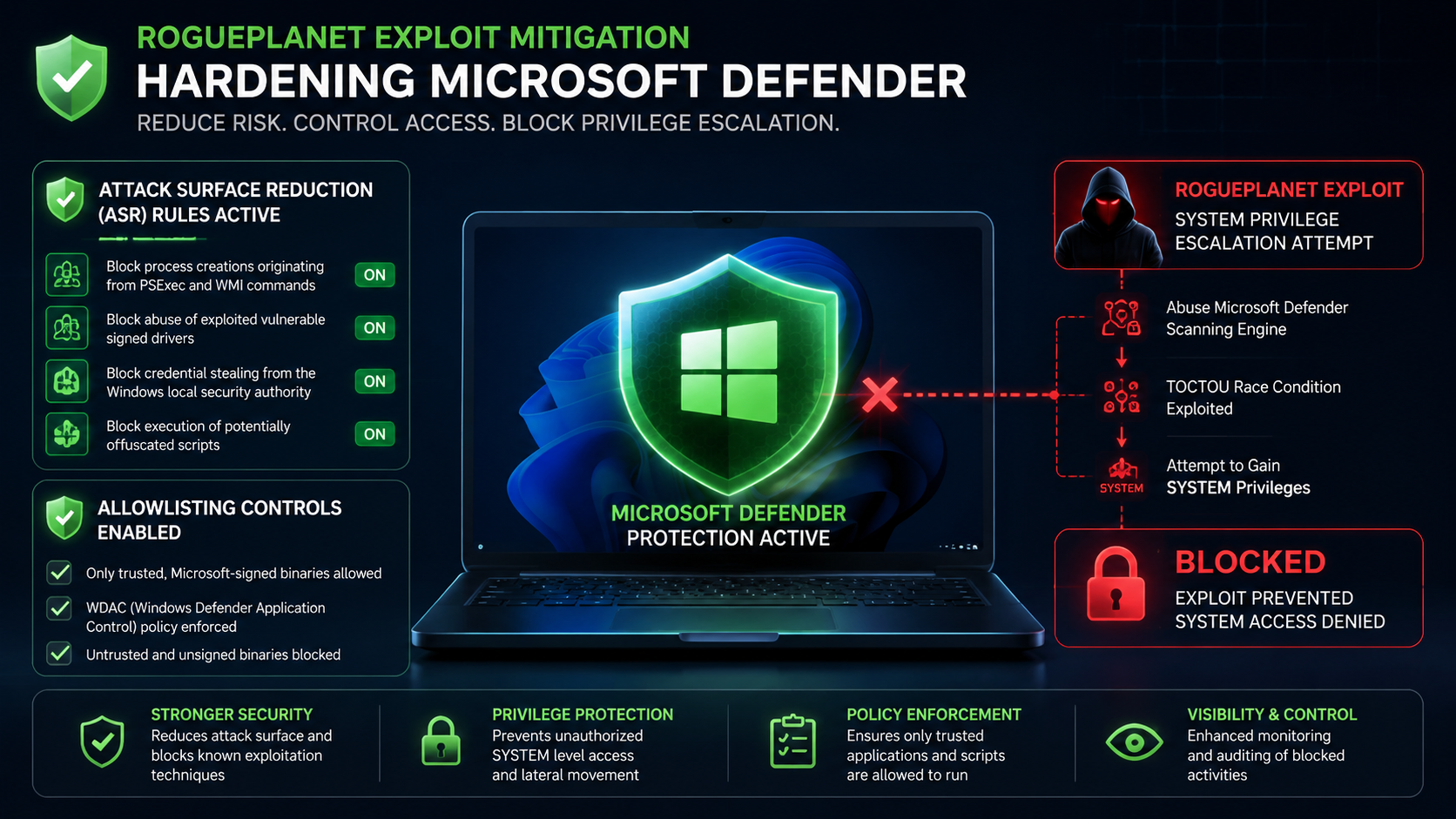
In RoguePlanet’s case, the issue is tied to the Microsoft Malware Protection Engine and its handling of file scanning and remediation logic. The exploit depends on a Time of Check to Time of Use race condition, often called TOCTOU.
A TOCTOU flaw exists when software checks a resource, then later uses that resource after a small delay. If an attacker can change the resource during that delay, the software may act on something different from what it checked.
Why the RoguePlanet Exploit Is More Dangerous Than Typical Exploits
RoguePlanet is dangerous because it targets a trusted security component. Defender scans untrusted files specifically to protect the user. That means attackers may be able to turn the protection workflow into part of the attack path.
The exploit is also concerning because public reporting suggests it may work whether Defender real-time protection is enabled or disabled. Some reporting also suggests risk may remain when Defender is running in passive mode behind another endpoint security product.
That means organisations should not assume that a third-party antivirus platform automatically removes Defender-related exposure. Mixed endpoint environments still need to assess whether Defender components are present, active, passive, or callable during file scanning activity.
How RoguePlanet Started as a More Severe Attack Path
Public reporting says RoguePlanet began as a more severe Defender attack path before Microsoft quietly closed parts of the original technique. Earlier versions reportedly involved remote SMB paths and file redirection behavior that could have created broader remote compromise scenarios.
Microsoft appears to have reduced the original path through earlier platform changes, but the remaining proof of concept still demonstrates local privilege escalation to SYSTEM under certain conditions.
That distinction matters for accuracy. The current public issue should be described as a Defender elevation of privilege vulnerability, not a confirmed remote code execution vulnerability. However, SYSTEM-level privilege escalation remains highly valuable to attackers.
Why the RoguePlanet Exploit Matters for Every Organisation
The RoguePlanet exploit matters because Microsoft Defender is widely deployed across Windows environments. Even when Defender is not the primary endpoint security platform, its components may still exist on the system.
Enterprise teams face risk because Windows endpoint fleets are large and difficult to manage consistently. One unmonitored path, one permissive endpoint configuration, or one user who mounts a malicious disk image can create an escalation opportunity.
Smaller organisations face risk because they often rely on Microsoft Defender as their primary protection layer. If they do not have strong application control, disk image restrictions, or endpoint behavioral monitoring, they may have fewer backup controls while waiting for Microsoft’s fix.
Enterprise Risk From the RoguePlanet Exploit
Large organisations often manage thousands of Windows endpoints across offices, remote workers, cloud-connected environments, and privileged admin workstations. That scale makes consistent mitigation harder.
If a standard user account is compromised, RoguePlanet may provide the attacker with a path to SYSTEM-level access. Once elevated, the attacker may attempt credential dumping, EDR tampering, persistence, and lateral movement.
Enterprise security teams should prioritize privileged workstations, administrator endpoints, developer systems, help desk machines, and endpoints that can access sensitive systems. These machines are more valuable if exploited.
SMB Risk From the RoguePlanet Exploit
Small and mid-size businesses often rely on default Defender settings. Many do not have mature allowlisting, advanced endpoint detection, or strict controls over disk image mounting.
That makes practical mitigation important. SMBs should block unusual file types at the email gateway, restrict VHD and VHDX mounting where possible, enable Microsoft Defender Attack Surface Reduction rules, and monitor for SYSTEM-level shell activity.
The goal is not to create a complex security program overnight. The goal is to reduce the chance that a malicious disk image leads to full endpoint control.
Cloud and Remote Work Exposure
Remote and hybrid workers increase exposure because files arrive through many channels. Email attachments, cloud-synced folders, file shares, collaboration platforms, and support ticket systems can all deliver unusual file types.
A malicious VHD or VHDX file may not look suspicious to every user. Some may think it is an archive, installer, backup image, or packaged project file. Once mounted, Defender scanning behavior becomes part of the exploit path.
Organisations should review inbound file controls and consider blocking disk image formats unless there is a clear business need.
Financial and Regulatory Exposure From RoguePlanet
A successful privilege escalation event can create major downstream impact. SYSTEM-level access can enable credential theft, security control interference, and access to sensitive data on the endpoint.
If the attacker uses that access to reach regulated data, customer information, healthcare records, financial records, or privileged systems, the organisation may face formal incident response, legal review, and breach notification obligations.
This is why a privilege escalation flaw should not be dismissed as less urgent than remote code execution. Privilege escalation often determines whether an initial compromise becomes a full breach.
For more on exposed infrastructure and urgent response windows, see Digital Warfare’s FortiClient code execution vulnerability analysis.
Real-World RoguePlanet Exploit Attack Scenarios
A phishing campaign could deliver a malicious VHDX file disguised as an installer, project archive, or internal document package. The user mounts the image, Defender scans it, and the attacker attempts to win the race condition to gain SYSTEM-level access.
An attacker with stolen standard user credentials could place the crafted disk image locally and trigger the exploit from a low-privilege session. If successful, the attacker moves from limited account access to full endpoint control.
A file share scenario is also realistic. An attacker with limited write access to a shared folder plants a malicious disk image where employees expect to find backup files or software packages. The first user who mounts it may become the compromise point.
A managed service provider technician could also be targeted. If the technician’s laptop is compromised and has access to multiple client environments, SYSTEM-level control of that device creates a much wider blast radius.
A fully patched organisation may still be exposed if the patch for RoguePlanet has not yet been released or deployed. This is the uncomfortable lesson: patch compliance from the latest Patch Tuesday does not automatically close a newly disclosed zero-day.
How to Detect the RoguePlanet Exploit on Your Network
Detection should focus on behavior. Race condition exploits are difficult to detect with simple signatures because the malicious action happens inside a narrow timing window and may use legitimate system processes.
Security teams should monitor disk image mount activity, Defender process behavior, SYSTEM-level shell creation, suspicious child processes, and post-exploitation actions such as credential dumping, security tool changes, or persistence creation.
The most important detection pattern is not only the VHD or VHDX file. It is what happens immediately after the file is mounted and scanned.
Logging Rules for the RoguePlanet Exploit
Enable detailed process creation logging across endpoints. Windows Event ID 4688 and Sysmon Event ID 1 are useful when command-line capture is enabled.
Log VHD and VHDX mount events. Disk image mounting by non-admin users, especially from Downloads, Temp, email attachment folders, cloud sync folders, or network shares, should be reviewed.
Capture Microsoft Defender operational logs and protection history. Look for unusual scan behavior around the same time as disk image mounting.
Enable PowerShell script block logging because attackers who gain SYSTEM-level access often use PowerShell for discovery, credential access, and post-exploitation automation.
EDR Detection Rules for RoguePlanet
EDR should alert when Defender-related processes spawn unexpected child processes, especially cmd.exe, powershell.exe, wscript.exe, cscript.exe, rundll32.exe, regsvr32.exe, or other tools often abused after elevation.
Security teams should flag command shells running as NT AUTHORITY\SYSTEM when there is no matching administrative task, scheduled task, software deployment, or approved maintenance activity.
EDR should also monitor for VHD and VHDX files mounted from risky locations. Disk images launched from email attachment caches, browser download folders, cloud sync folders, or temporary directories deserve immediate review.
Rapid file access and modification sequences on newly mounted disk images may also indicate race condition activity or exploit testing.
SIEM Correlation Rules
Build SIEM rules that correlate disk image mounting with Defender scan events and SYSTEM-level process creation within a short time window. The tighter the window, the more useful the signal.
Create correlation logic that flags Defender-related processes spawning shell interpreters. This should be rare in normal business activity.
Correlate inbound emails containing VHD, VHDX, ISO, IMG, or other disk image formats with endpoint mount events. If an unusual attachment later triggers local SYSTEM activity, escalate immediately.
Flag SYSTEM-level command execution where there is no matching admin login, scheduled task, software update, or endpoint management action.
Threat Hunting Steps for RoguePlanet
Threat hunters should review recent VHD and VHDX mount events from non-admin users. Focus on the period surrounding public disclosure and any future window before Microsoft’s patch is fully deployed.
Search for SYSTEM-level command shells that do not align with known administration activity. Review parent-child process relationships carefully, especially anything linked to Defender scanning, mounted volumes, or recently downloaded files.
Review email gateway logs for inbound disk image attachments. These file types are unusual in many business environments and should be treated as suspicious unless there is a clear business justification.
Check endpoints for Defender configuration changes, disabled protections, new exclusions, suspicious scheduled tasks, unknown local admins, or signs of credential dumping after disk image activity.
Identity and Access Monitoring
Review any account that shows new administrative activity after suspected RoguePlanet-related behavior. A successful privilege escalation may be followed by credential theft and wider identity abuse.
Check for signs of LSASS access, token theft, local administrator group changes, remote desktop attempts, and unusual authentication from the affected endpoint.
Set conditional access policies that require healthy, compliant devices before granting access to sensitive resources. If a device shows suspicious disk image or SYSTEM-level activity, block or challenge access until it is investigated.
For broader Windows and EDR evasion context, see Digital Warfare’s analysis of AI-powered Active Directory attacks and EDR evasion.
How to Defend Against the RoguePlanet Exploit Right Now
Because Microsoft has not yet released the final security update at the time of writing, compensating controls are the priority. These controls should reduce exploitability and limit damage if an attacker attempts to use the flaw.
Start with Attack Surface Reduction rules. Enable Defender ASR rules that block credential theft from LSASS and abuse of vulnerable signed drivers. These controls may not fix the underlying race condition, but they help reduce the attacker’s next steps after SYSTEM access.
Application allowlisting is also important. ThreatLocker reported that allowlisting controls blocked the exploit path. Allowlisting reduces risk by preventing unapproved code from running, even if an attacker wins the race condition.
Enable Attack Surface Reduction Rules Now
Microsoft Defender Attack Surface Reduction rules help reduce common post-exploitation activity. Organisations should enable rules that block credential theft from LSASS and reduce abuse of vulnerable signed drivers.
These rules are not a replacement for a Microsoft patch. They do not remove the underlying vulnerability. However, they add friction where attackers are most likely to go next.
ASR rules should be tested, deployed in audit mode where necessary, then enforced across high-risk endpoint groups as quickly as possible.
Deploy Application Allowlisting
Application allowlisting can prevent unapproved scripts, binaries, and payloads from executing. This is especially valuable when a vulnerability gives attackers an opportunity to run code through a trusted process.
Allowlisting works best when it is already deployed and tuned. However, organisations can still prioritize high-risk systems such as admin workstations, finance endpoints, help desk machines, developer devices, and endpoints with access to sensitive systems.
Allowlisting does not need to detect the race condition itself. It reduces the chance that the attacker’s payload can run after the exploit succeeds.
Restrict Disk Image Mounting
Restrict standard users from mounting VHD and VHDX files where business operations allow it. Disk image mounting is not required for most everyday users.
Apply Group Policy or endpoint management controls to limit who can mount disk images. High-risk departments and users should receive tighter restrictions first.
Block VHD, VHDX, ISO, and IMG attachments at the email gateway unless there is a documented business need. Review cloud sync and file-sharing controls for the same file types.
Lock Down Network File Shares
File shares can become delivery paths for malicious disk images. Restrict write access to shared folders and monitor for newly created VHD or VHDX files.
Review SMB share permissions and remove broad access where it is not needed. Disable risky symlink behavior where possible and monitor for suspicious file replacement patterns.
File integrity monitoring can help identify disk images planted in unusual locations. Security teams should pay attention to newly created disk images in shared drives, project folders, and temporary collaboration spaces.
Track the Patch and Apply It Immediately
Track Microsoft’s advisory for CVE-2026-50656 and deploy the official update as soon as it becomes available. Because the vulnerability affects a core security component, patch status should be tracked centrally.
Do not rely only on monthly patch compliance dashboards. Confirm the Microsoft Malware Protection Engine and Defender components are actually updated across Windows 10 and Windows 11 endpoints.
Include devices running Defender in passive mode. They should remain in scope until Microsoft guidance confirms otherwise.
Validate Backups and Review Access Rights
If an endpoint shows signs of privilege escalation, validate backups and review local changes. SYSTEM-level access can allow attackers to alter files, disable protections, create persistence, and tamper with local evidence.
Review access rights for any account used on the affected endpoint. Credential theft after privilege escalation can expose domain accounts, cloud identities, VPN access, and privileged sessions.
Least privilege matters. The less access an endpoint has to sensitive systems, the less damage a successful RoguePlanet exploit can cause.
For the one external source in this article, review the Microsoft Security Update Guide entry for CVE-2026-50656.
Why the RoguePlanet Exploit Signals a Bigger Problem for Defenders
The RoguePlanet exploit is bigger than one Defender bug. It reflects a broader trend where attackers and researchers increasingly focus on the security tools defenders trust most.
Security controls inspect files, monitor processes, hook operating system behavior, and run with elevated privileges. That power is necessary, but it also makes them attractive targets.
Defenders must include security tooling in their own threat models. Endpoint protection platforms, SIEMs, EDR agents, backup tools, and remote management systems all need hardening, monitoring, and backup controls.
Security Tools Are Now High-Value Attack Targets
Microsoft Defender exists to protect Windows endpoints, but RoguePlanet shows how the scanning engine itself can become part of an attack path.
This same lesson applies across the security stack. Any tool that inspects untrusted files, runs privileged services, or has broad visibility can become a high-value target.
Security teams should monitor security tools with the same seriousness they apply to business-critical applications. Blind trust is no longer safe.
A New Monthly Disclosure Pattern Is Emerging
Public reporting around RoguePlanet also highlights the pressure created by rapid vulnerability disclosure. When a proof of concept appears shortly after Patch Tuesday, defenders may face a newly exposed issue before they have finished deploying the previous month’s updates.
Whether the disclosure process is coordinated or hostile, the operational reality is the same. Security teams need the ability to assess exposure, apply compensating controls, and communicate risk within days.
Waiting for the next routine patch cycle is not enough when working exploit material is already public.
AI Tools Are Shrinking the Time to Exploit
AI-assisted vulnerability research and exploit development are accelerating both offensive and defensive workflows. Attackers can analyze advisories, generate detection bypass ideas, and adapt public proof-of-concept material faster than many organisations can patch.
Defenders need faster asset inventory, faster change approval, and faster detection engineering. A five-day exploitation window can quickly become a two-day window or less.
The RoguePlanet exploit fits this broader trend. The faster exploit material spreads, the more important compensating controls become.
Passive Mode Is Not a Safety Net
Many organisations assume Defender-specific risk disappears when Defender runs behind another endpoint protection product. Public testing suggests that assumption may not be safe for RoguePlanet.
Passive mode does not always mean irrelevant. Defender components may still exist, update, scan, or interact with files in ways that matter for this vulnerability class.
Security teams should inventory Defender state across the environment and include passive deployments in monitoring until Microsoft guidance says they are out of scope.
Key Takeaway on the RoguePlanet Exploit
The RoguePlanet exploit is a working public proof of concept that abuses Microsoft Defender’s scanning behavior to achieve SYSTEM-level access under certain conditions. Microsoft tracks the issue as CVE-2026-50656 and describes it as an elevation of privilege vulnerability in the Microsoft Malware Protection Engine.
The safest response is to deploy compensating controls immediately while tracking Microsoft’s official patch. Restrict disk image mounting, block risky attachments, enable ASR rules, strengthen allowlisting, and monitor for Defender-related SYSTEM shell activity.
This is a reminder that security tooling must be protected, monitored, and hardened just like every other high-value system in the environment.
What to Do Right Now
Enable Microsoft Defender Attack Surface Reduction rules that help block vulnerable driver abuse and LSASS credential theft. These reduce common attacker actions after privilege escalation.
Deploy or strengthen application allowlisting, especially on high-value workstations, administrator devices, and systems that can reach sensitive internal resources.
Restrict standard user ability to mount VHD and VHDX files wherever business operations allow. Block disk image attachments through email and review cloud file-sharing controls.
Monitor for Defender-related processes spawning unexpected SYSTEM-level shells. Correlate disk image mount events with command execution, Defender scanning activity, and security control changes.
Track CVE-2026-50656 through Microsoft’s official advisory and deploy the patch as soon as it becomes available. Treat Defender passive mode systems as in scope until Microsoft guidance confirms otherwise.
For broader endpoint security validation, see Digital Warfare’s vulnerability assessment services.
Frequently Asked Questions About the RoguePlanet Exploit
What Is the RoguePlanet Exploit?
The RoguePlanet exploit is a publicly discussed proof of concept that abuses a race condition and improper link resolution behavior inside Microsoft Defender’s malware scanning engine. Microsoft tracks the issue as CVE-2026-50656 and describes it as an elevation of privilege vulnerability.
Is RoguePlanet Being Actively Exploited Right Now?
Public proof-of-concept material is available, and independent testing has confirmed the exploit behavior. At the time of writing, organisations should verify active exploitation status through Microsoft’s official advisory and their own threat intelligence sources. Even without confirmed widespread exploitation, the public PoC makes the risk urgent.
How Does RoguePlanet Work?
RoguePlanet works by abusing a Time of Check to Time of Use race condition. The attacker uses a crafted VHD or VHDX disk image. When Defender scans the mounted image, the attacker attempts to manipulate the file or link target during the scan window, potentially leading to SYSTEM-level access.
Why Is RoguePlanet Dangerous?
RoguePlanet is dangerous because it targets Microsoft Defender, a trusted security component that runs widely across Windows environments. Successful exploitation can give an attacker SYSTEM-level privileges, which can support credential theft, persistence, security tool tampering, and lateral movement.
Who Is Affected by RoguePlanet?
Public reporting indicates Windows 10 and Windows 11 client systems using Microsoft Defender are the primary concern. Systems where Defender is disabled, passive, or behind another security tool should still be reviewed until Microsoft guidance confirms their exposure status.
How Should Organisations Respond to RoguePlanet?
Organisations should enable relevant Microsoft Defender Attack Surface Reduction rules, deploy application allowlisting, restrict VHD and VHDX mounting, block disk image attachments, monitor for suspicious SYSTEM-level shell creation, and track Microsoft’s CVE-2026-50656 advisory for the official security update.

